Comparisons
OpenClaw vs n8n: 7 Key Differences Compared (2026)
18 min read · Updated 2026-03-08
By DoneClaw Team · We run managed OpenClaw deployments and write from hands-on production experience.
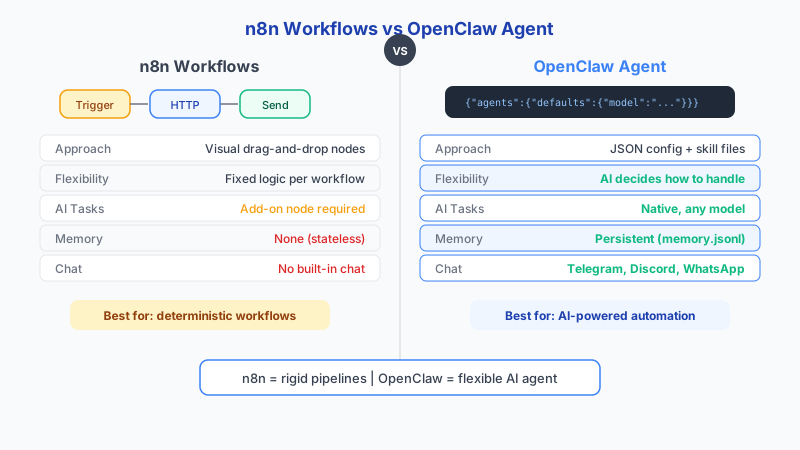
OpenClaw and n8n are two of the most talked-about tools in the AI automation space in 2026, but comparing them directly is a category error. OpenClaw is an AI agent runtime built around conversation, persistent memory, and model-driven reasoning. n8n is a workflow automation platform built around deterministic event pipelines, visual flow builders, and integration connectors. This complete comparison guide breaks down exactly what each tool does, where each one excels, what they cost, and — most importantly — when you should use one, the other, or both together. Whether you are evaluating OpenClaw vs n8n for a personal project, a startup, or an enterprise deployment, this guide covers every angle you need to make a confident decision.
1. What Is OpenClaw?
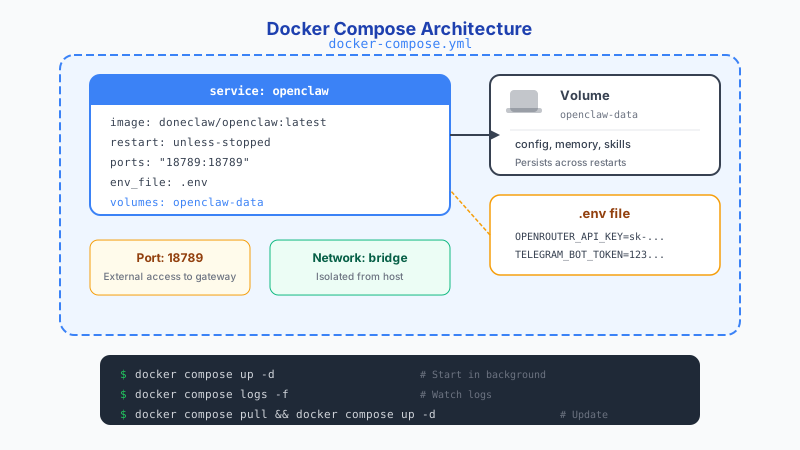
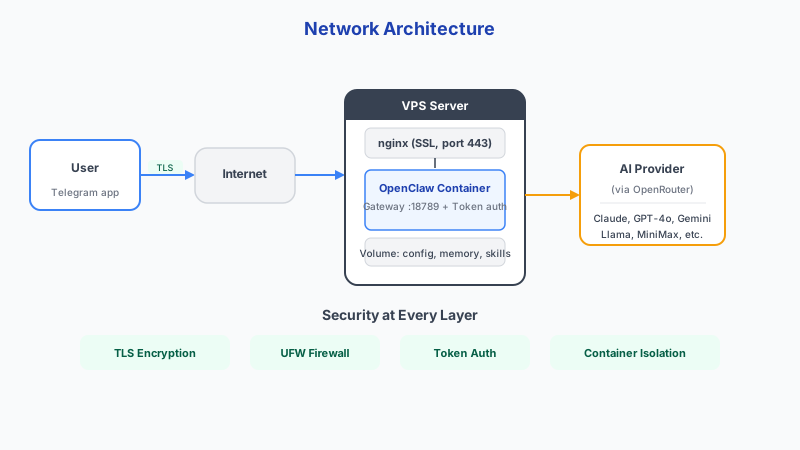
OpenClaw is an open-source AI agent runtime that runs as a Docker container. It provides a persistent, always-on AI agent with built-in conversation memory, channel integrations (Telegram, Discord, WhatsApp), and support for any LLM via OpenRouter. Your agent remembers every conversation, learns your preferences, and executes tasks autonomously through skills and cron jobs. See our complete deployment guide for setup details.
The core value proposition is simple: instead of visiting a chat window every time you need AI help, OpenClaw gives you an agent that lives in your existing messaging apps and remembers everything. It runs 24/7, responds to scheduled tasks, and maintains context across weeks and months of interaction.
OpenClaw is designed for people who want a personal AI assistant, not a workflow builder. You talk to it naturally, it remembers what you said, and it can take action on your behalf. The agent paradigm is fundamentally different from the pipeline paradigm that n8n uses.
For those who want OpenClaw without managing infrastructure, DoneClaw offers fully managed hosting at doneclaw.com — your own dedicated container with automatic updates, SSL, and channel integrations pre-configured.
2. What Is n8n?
n8n is an open-source workflow automation platform that lets you connect services, transform data, and build multi-step automations using a visual node-based editor. It competes with Zapier and Make.com but differentiates itself by being self-hostable and developer-friendly.
n8n excels at deterministic workflows: when event X happens, do steps A, B, C in order. It has 500+ built-in integrations, 1,700+ community templates, and a visual canvas that makes complex multi-branch workflows easy to build and debug. Recent versions have added LangChain nodes, ReAct agent support, and vector database integration.
The n8n pricing model reflects its workflow focus. The Community edition is completely free when self-hosted. n8n Cloud plans start at 24 EUR per month (Starter, 2,500 executions), 60 EUR per month (Pro, 10,000 executions), and 800+ EUR per month (Enterprise). Execution-based pricing means costs scale with workflow volume, not AI model usage.
For context in the automation market: Zapier offers 7,000+ integrations at $20-100 per month targeting non-technical users. Make.com provides roughly 1,500 integrations at about 60% lower cost than Zapier. n8n has fewer integrations but is free when self-hosted, making it the strongest option for engineers who want full control over their automation infrastructure.
3. Architecture Comparison
Understanding the architectural differences between OpenClaw and n8n explains why they serve different purposes and why comparing them as direct competitors misses the point.
OpenClaw runs as a single Docker container per user. Inside that container, a Node.js process manages the AI agent, conversation history, memory storage, channel connections, and skill execution. The agent receives messages from connected channels, processes them through an LLM, maintains context in a local JSONL session file, and sends responses back. Everything is stateful — the agent knows who you are and what you have discussed before.
n8n runs as a server with a PostgreSQL (or SQLite) database backend. It exposes a web UI where you build workflows by connecting nodes. Each node represents an action: receiving a webhook, querying a database, calling an API, transforming data, sending a message. Workflows are triggered by events (cron, webhook, manual) and execute deterministically from start to finish. State exists within a workflow execution but does not persist between executions unless you explicitly store it.
The key architectural difference is statefulness. OpenClaw is stateful by default — every interaction builds on previous context. n8n is stateless by default — each workflow execution is independent. This distinction drives every other difference between the two platforms.
4. Complete Feature Comparison Table
This table covers every major feature dimension where OpenClaw and n8n differ. Use it as a quick reference for your evaluation.
Feature Comparison: OpenClaw vs n8n (2026)

| Feature                  | OpenClaw                                  | n8n                                        |
|--------------------------|-------------------------------------------|--------------------------------------------|
| Primary purpose          | AI agent with conversation + memory       | Workflow automation + integration platform |
| Architecture             | Stateful agent (Docker container)         | Stateless workflow engine (server + DB)    |
| Memory                   | Persistent across all conversations       | Per-execution only (manual DB for state)   |
| LLM support              | Any model via OpenRouter (50+ models)     | LangChain nodes (OpenAI, Anthropic, etc.)  |
| Channel integrations     | Telegram, Discord, WhatsApp (native)      | Via nodes (Slack, Email, Telegram, etc.)   |
| Conversation ability     | Full natural language chat                | No conversational interface                |
| Visual builder           | No (config-driven)                        | Yes (node-based canvas)                    |
| Service integrations     | Via skills + webhooks                     | 500+ built-in connectors                  |
| Community templates      | ClawHub skills library                    | 1,700+ workflow templates                  |
| Scheduling               | Cron jobs + heartbeat skills              | Cron triggers + webhook triggers           |
| Self-hosted cost         | $5-20/mo VPS + model API costs            | Free (Community) + VPS + DB costs          |
| Cloud cost               | $29/mo (DoneClaw managed)                 | EUR 24-800+/mo (execution-based)           |
| Setup complexity         | Docker run + config file                  | Server + DB + credential manager           |
| Maintenance time         | 1-2 hours/month                           | 3-6 hours/month                            |
| Best for                 | Personal AI assistant, conversational AI  | Business process automation, ETL, CRM      |
| Learning curve           | Moderate (Docker + config)                | Low-moderate (visual builder)              |
| Error handling           | Agent retries + memory of failures        | Visual error branches + retry nodes        |
| Observability            | Container logs + session files            | Execution history + visual debugging       |
| Multi-user               | One container per user                    | Multi-user with RBAC                       |
| API access               | HTTP API per container                    | Full REST API + webhook endpoints          |
5. Memory and Context: The Fundamental Difference
Memory is the single most important architectural difference between OpenClaw and n8n, and it is the reason they serve fundamentally different use cases.
OpenClaw maintains persistent memory across every conversation. When you tell your agent your project deadline is March 15th, it remembers. When you mention a colleague named Sarah who handles the marketing budget, it remembers. Three weeks later, when you ask "what did Sarah say about the Q2 budget?", the agent can retrieve that context. This memory is not a bolted-on feature — it is the core of how OpenClaw operates.
n8n has no concept of conversational memory. Each workflow execution starts fresh. You can store data in a database between executions, and you can pass variables through a workflow, but there is no built-in system for "remembering" past interactions. If you need state persistence in n8n, you build it yourself using database nodes, file storage, or external services.
This difference means OpenClaw excels at tasks that require understanding context over time: personal assistance, ongoing project management, relationship tracking, habit monitoring, and any workflow where the AI needs to know your history. n8n excels at tasks that are self-contained: process this webhook payload, sync these two databases, send this scheduled report.
A practical example illustrates the gap. Imagine you receive an email from a client asking about "the proposal we discussed." In OpenClaw, the agent checks its memory, finds the previous conversation about the proposal, and drafts a contextual reply. In n8n, a workflow would need to query an external database, match the sender to stored proposals, and construct a response using templating — possible, but significantly more complex to build and maintain.
6. Integrations and Ecosystem
n8n has a clear advantage in raw integration count. With 500+ built-in connectors covering CRMs, databases, cloud storage, payment processors, marketing platforms, and communication tools, n8n can connect to almost any SaaS service out of the box. The visual node editor makes it easy to chain these integrations together without writing code.
OpenClaw takes a different approach to integrations. Instead of pre-built connectors, OpenClaw uses skills (markdown instruction files), webhooks, and the agent's ability to use tools. A skill can call any API, parse any response, and store results in memory. The trade-off is that you need to define the integration logic yourself (or install a community skill from ClawHub), but the agent can handle the integration conversationally — you describe what you want, and it figures out the API calls.
For common integrations like Telegram, Discord, and WhatsApp, OpenClaw has native channel support that is deeper than n8n's nodes. Your agent lives inside the messaging app, maintaining ongoing conversations. n8n's Telegram or Slack nodes are for sending and receiving individual messages within a workflow, not for maintaining an ongoing presence.
The n8n community template library (1,700+ templates) is a significant advantage for getting started quickly. You can find a pre-built workflow for almost any common automation. OpenClaw's ClawHub skill library is growing but smaller. However, OpenClaw skills are simpler to create — a skill is a markdown file with instructions, while an n8n workflow template requires the visual builder and understanding of node configuration.
Try DoneClaw free for 7 days — cancel anytime
Full access during your trial. No credit card charged until day 8. Cancel from the Stripe portal with one click.
Try Free for 7 Days7. Where They Work Best Together
The most powerful setup is running OpenClaw and n8n together with clear boundaries. This is not a theoretical suggestion — it is the architecture that teams with both conversational AI and automation needs consistently converge on.
OpenClaw handles the reasoning layer: understanding user intent, making judgment calls on ambiguous input, maintaining conversational context, and deciding what actions to take. n8n handles the execution layer: reliably calling APIs, transforming data between formats, retrying failed operations, and managing complex multi-step workflows with error handling.
The connection between them is webhooks. OpenClaw can trigger n8n workflows when it decides an action is needed. n8n can send data to OpenClaw when it needs AI reasoning to make a decision within a workflow. This bidirectional communication creates a system that is both intelligent and reliable.
A concrete example: an e-commerce support system. The customer messages OpenClaw via Telegram. OpenClaw understands the issue, checks order history from memory, and decides the customer needs a refund. OpenClaw triggers an n8n workflow via webhook. n8n processes the refund through Stripe, updates the order status in the database, sends a confirmation email, and logs the event in the CRM. OpenClaw confirms the resolution to the customer in the chat thread, remembering this interaction for future reference.
- OpenClaw: user-facing agent, intent understanding, memory, and judgment
- n8n: API orchestration, data transformation, retries, and error handling
- Connection: webhooks in both directions
- Shared: audit logs and approval gates for risky actions
8. Cost Comparison
Understanding the true cost of each platform requires looking beyond the sticker price. Both tools have variable costs that depend on usage patterns.
OpenClaw self-hosted costs $5-20 per month for a VPS (depending on provider and specs), plus LLM API costs through OpenRouter. A typical personal user spending $0.50-3.00 per day on model API calls pays $15-90 per month in API costs. DoneClaw managed hosting costs $29 per month and includes the server, container management, automatic updates, SSL, and channel integrations. API costs are separate.
n8n self-hosted is free (Community edition) but requires a VPS ($5-20 per month) plus a database (PostgreSQL, either on the same VPS or a managed service at $5-15 per month). n8n Cloud starts at 24 EUR per month for 2,500 executions. The Pro plan at 60 EUR per month gives 10,000 executions. Enterprise pricing starts at 800 EUR per month.
The cost scaling curves are different. OpenClaw costs scale with AI model usage — more conversations and more complex reasoning costs more in API tokens. n8n costs scale with workflow executions — more automations running more frequently costs more. For a personal AI assistant use case, OpenClaw is typically cheaper. For a business automation use case with thousands of daily workflow executions, n8n's execution-based pricing may be more predictable.
Maintenance cost is often overlooked. OpenClaw requires 1-2 hours per month for a single-process runtime — checking logs, updating the container, and adjusting skills. n8n requires 3-6 hours per month for workflow versioning, credential rotation, queue monitoring, and debugging failed executions. This maintenance overhead adds real cost in engineering time.
Monthly Cost Comparison (typical scenarios)

Personal AI Assistant:
  OpenClaw self-hosted: $10 VPS + $30-60 API = $40-70/mo
  DoneClaw managed:     $29 + $30-60 API     = $59-89/mo
  n8n (for this use):   Not suitable (no conversational AI)

Business Workflow Automation (500 executions/day):
  n8n self-hosted:      $15 VPS + $10 DB = $25/mo
  n8n Cloud Pro:        EUR 60/mo (~$65)
  OpenClaw (for this):  Not suitable (no visual workflow builder)

Hybrid Setup (AI agent + business automation):
  OpenClaw + n8n self-hosted: $10-20 VPS + $30-60 API + $10 DB = $50-90/mo
  DoneClaw + n8n Cloud:       $29 + $30-60 API + EUR 24 = $79-115/mo
9. Decision Framework: Which Should You Use?
Use this framework to decide whether OpenClaw, n8n, or both is the right choice for your situation.
Choose OpenClaw if your primary need is a personal AI assistant that remembers context, operates through messaging apps, and makes judgment calls on ambiguous tasks. OpenClaw is ideal for individuals and small teams who want a conversational AI that learns and improves over time.
Choose n8n if your primary need is connecting business systems, automating repetitive workflows, and building reliable event-driven pipelines. n8n is ideal for teams that need visual workflow building, extensive service integrations, and execution-based automation without AI reasoning.
Use both if you need conversational AI reasoning AND reliable workflow execution. Put OpenClaw in front of users for conversation and decision-making. Put n8n behind the scenes for API calls, data transformations, and multi-step business logic. Connect them with webhooks.
Do not choose OpenClaw when you need a visual workflow builder, hundreds of pre-built integrations, or stateless event processing. Do not choose n8n when you need persistent conversational memory, a natural language interface, or an always-on AI assistant in messaging apps.
Decision Matrix: OpenClaw vs n8n

Your primary need:                              → Best choice:

"I want a personal AI assistant"                → OpenClaw (or DoneClaw)
"I want to automate business workflows"         → n8n
"I want AI that remembers everything"           → OpenClaw
"I want to connect 10+ SaaS tools"             → n8n
"I want to chat with AI in Telegram"            → OpenClaw
"I want to process 1000 webhooks/day"           → n8n
"I want both AI reasoning + workflow execution" → Both (OpenClaw + n8n)
"I want a no-code visual builder"               → n8n
"I want scheduled AI tasks with memory"         → OpenClaw
"I want error handling with retry logic"        → n8n
10. Real-World Example: Email Processing Pipeline
This example shows how the same task — processing incoming email — works in each platform and in a combined setup. It illustrates the strengths and trade-offs of each approach.
Example: "Process incoming email" workflow

In OpenClaw (agent-based):
  1. Email arrives via webhook → agent receives it
  2. Agent reads email, understands intent using LLM
  3. Agent checks memory for sender history and context
  4. Agent drafts reply or creates task based on judgment
  5. Agent sends response via configured channel
  → Best when: emails vary widely, need context from past conversations
  → Cost: ~$0.01-0.05 per email (LLM tokens)
  → Limitation: No built-in retry or error branching

In n8n (workflow-based):
  1. Email trigger node watches inbox
  2. Filter node routes by sender/subject rules
  3. HTTP node calls external API (CRM, ticketing)
  4. Transform node formats data
  5. Send node delivers to Slack/email/webhook
  → Best when: emails follow patterns, actions are deterministic
  → Cost: 1 execution per email (counted toward plan limit)
  → Limitation: No understanding of email context or sender history

Combined approach (recommended for complex email handling):
  1. n8n watches inbox and classifies by rule
  2. Rule-matching emails → n8n handles directly (fast, cheap)
  3. Ambiguous emails → n8n forwards to OpenClaw webhook
  4. OpenClaw reads, reasons, drafts response with memory context
  5. OpenClaw sends reply or triggers n8n workflow for execution
  → Best when: mix of routine and complex emails
  → Cost: Most emails handled cheaply by n8n, only ambiguous ones use LLM
  → Advantage: Reliable automation + intelligent reasoning combined
11. Migration and Getting Started
If you already use n8n and want to add AI agent capabilities, adding OpenClaw alongside it is straightforward. Run OpenClaw as a separate Docker container on the same server. Set up a webhook endpoint in OpenClaw. Create n8n workflows that call OpenClaw when AI reasoning is needed. The two systems coexist without conflict.
If you already use OpenClaw and want to add workflow automation, install n8n on the same server or a separate one. Create OpenClaw skills that trigger n8n workflows via HTTP. n8n handles the multi-step execution, OpenClaw handles the reasoning and user interaction.
If you are starting from scratch, decide your primary use case first. For personal AI assistance, start with OpenClaw (or DoneClaw for managed hosting) and add n8n later if you need workflow automation. For business process automation, start with n8n and add OpenClaw later if you need conversational AI.
For the fastest path to a working personal AI agent with no infrastructure management, DoneClaw at doneclaw.com provides a fully managed OpenClaw instance with Telegram, Discord, and WhatsApp integrations. You can be chatting with your agent in under 5 minutes.
12. Key Differences Between OpenClaw and n8n
While sections above cover specific feature comparisons, this section distills the fundamental differences between OpenClaw and n8n into four core distinctions that drive every practical decision.
First, OpenClaw is an AI agent while n8n is a workflow automation tool. OpenClaw runs a persistent AI that reasons, remembers, and responds autonomously. n8n executes predefined sequences of steps when triggered. An agent decides what to do based on context. A workflow does exactly what you built it to do, every time. This is the most important difference to understand — they are different categories of software.
Second, OpenClaw has persistent memory while n8n does not. Every conversation, decision, and piece of information your OpenClaw agent encounters is stored and retrievable in future interactions. n8n workflows start with a blank slate on every execution. You can bolt state onto n8n using database nodes, but it requires manual engineering for every piece of data you want to persist. In OpenClaw, memory is automatic and universal.
Third, OpenClaw uses natural language while n8n uses a visual node editor. You interact with OpenClaw by typing messages in plain English (or any language) through Telegram, Discord, or WhatsApp. You build n8n automations by dragging nodes onto a canvas and connecting them with wires. Natural language is faster for ad-hoc tasks and evolving requirements. Visual editors are better for complex, fixed pipelines that multiple team members need to understand and maintain.
Fourth, OpenClaw runs autonomously while n8n runs triggered workflows. An OpenClaw agent can proactively reach out to you with information, monitor conditions, and take action without being explicitly triggered. n8n workflows only run when a trigger fires — a webhook arrives, a cron schedule hits, or someone clicks "Execute." The difference matters most for tasks that require judgment about when to act, not just what to do.
13. Can You Use OpenClaw and n8n Together?
Yes — OpenClaw and n8n are complementary tools, and using them together is the recommended approach for users who need both conversational AI and reliable workflow automation.
Use n8n for scheduled and triggered workflows where determinism matters. Data syncs between services, report generation on a schedule, webhook processing, file format conversions, and multi-step API orchestration are all n8n strengths. These tasks follow predictable logic and benefit from n8n's visual debugging, retry mechanisms, and 500+ built-in connectors.
Use OpenClaw for complex reasoning and conversations where context and judgment matter. Answering questions that require knowledge of past interactions, triaging ambiguous requests, drafting context-aware responses, and making decisions that depend on accumulated experience are all OpenClaw strengths. These tasks require persistent memory and the ability to handle novel situations.
A practical example of using both together: n8n monitors your company's support inbox with a scheduled trigger every 5 minutes. It classifies incoming emails by sender domain and keyword matching. Routine emails (password resets, subscription confirmations) are handled entirely by n8n workflows. Complex or ambiguous emails are forwarded to OpenClaw via a webhook. OpenClaw reads the email, checks its memory for past interactions with that sender, drafts a contextual reply, and sends the response. n8n logs the resolution in your CRM. Each tool handles the part it does best — n8n for reliable classification and routing, OpenClaw for reasoning and response generation.
The connection layer between them is simple: HTTP webhooks in both directions. OpenClaw skills can call n8n workflow URLs to trigger execution. n8n HTTP Request nodes can send data to OpenClaw's API for AI processing. No special integration or plugin is needed — just standard HTTP calls between two services running on the same network.
Conclusion
OpenClaw and n8n are complementary tools that solve different problems. OpenClaw is your AI reasoning and conversation layer — persistent memory, natural language understanding, and channel-native interaction. n8n is your workflow execution layer — deterministic pipelines, service integrations, and visual automation building. The best setups use both with clear boundaries: reasoning in OpenClaw, execution in n8n, connected by webhooks. Exploring other options? See our AI agent alternatives comparison. For a managed OpenClaw experience without infrastructure overhead, DoneClaw provides everything you need at doneclaw.com.
Skip the setup? DoneClaw deploys OpenClaw for you — $29/mo with 7-day free trial, zero configuration.
Try DoneClaw free for 7 days — cancel anytime
Full access during your trial. No credit card charged until day 8. Cancel from the Stripe portal with one click.
Try Free for 7 DaysFrequently asked questions
What is the difference between OpenClaw and n8n?
OpenClaw is an AI agent runtime focused on conversation, persistent memory, and model-driven reasoning. n8n is a workflow automation platform focused on deterministic event pipelines and service integrations. OpenClaw is stateful (remembers everything), while n8n is stateless (each execution is independent). They solve different problems and work well together.
Can OpenClaw replace n8n?
Not directly. They solve different layers. OpenClaw handles conversational AI workflows with persistent memory, while n8n excels at deterministic multi-step integrations with 500+ built-in connectors. Trying to force one into the other's role increases complexity and produces worse results. The recommended approach is using both together.
Can n8n replace OpenClaw conversation memory?
No. n8n can store state in variables and databases, but it is not built as a conversational memory-native agent runtime. It has no concept of conversation history, context injection, or memory retrieval. You would need to build a custom memory system on top of n8n, which defeats the purpose.
Is n8n or OpenClaw better for personal use?
OpenClaw is better for personal use as an AI assistant. It provides persistent memory, natural language conversation, and messaging app integration. n8n is better for personal workflow automation like syncing files, processing emails by rules, or scheduling reports. If you want a personal AI that remembers you and lives in Telegram, choose OpenClaw.
Is OpenClaw better than n8n for AI automation?
It depends on what kind of AI automation you need. OpenClaw is better for conversational AI, context-aware decision making, and tasks that require persistent memory. n8n is better for deterministic AI workflows using LangChain nodes, like batch-processing documents through an LLM or building RAG pipelines with its vector database nodes. For complex setups, use both.
What about using both together?
This is the recommended approach for complex setups. Use n8n for reliable data pipelines, triggers, and service integrations. Use OpenClaw for AI reasoning, conversation, and persistent memory. Connect them through webhooks: n8n calls OpenClaw for decisions, OpenClaw triggers n8n workflows for execution. Each tool handles what it does best.
How much does OpenClaw cost compared to n8n?
OpenClaw self-hosted costs $5-20/month for a VPS plus LLM API costs ($15-90/month depending on usage). DoneClaw managed hosting is $29/month plus API costs. n8n Community is free self-hosted (plus $5-20/month VPS and database costs). n8n Cloud starts at EUR 24/month. Total cost depends on your use case — AI assistant usage scales with model tokens, workflow automation scales with execution count.
What is the difference between n8n and OpenClaw?
The core difference is that OpenClaw is an AI agent with persistent memory and natural language interaction, while n8n is a workflow automation platform with a visual node editor and 500+ service connectors. OpenClaw remembers every conversation and makes judgment calls autonomously. n8n executes predefined step-by-step workflows triggered by events. They solve different problems — OpenClaw for conversational AI assistance, n8n for deterministic business automation.
Can n8n replace OpenClaw?
No. n8n cannot replace OpenClaw because it lacks persistent conversational memory, natural language understanding, and autonomous agent behavior. n8n can add AI nodes using LangChain, but these are stateless — each workflow execution starts fresh with no memory of previous interactions. If you need an always-on AI assistant that remembers context and lives in your messaging apps, that is what OpenClaw does and n8n does not.
Is OpenClaw better than n8n for personal automation?
For personal AI assistance — yes. OpenClaw excels at tasks requiring memory, conversation, and judgment: daily briefings, email triage, habit tracking, research, and anything where context from past interactions matters. For personal workflow automation like syncing files between services, processing form submissions, or scheduling social media posts, n8n is better because it has pre-built connectors and a visual builder. Many users run both for maximum coverage.