Comparisons
Telegram vs WhatsApp vs Discord: Best Channel for OpenClaw
8 min read · Updated 2026-02-22
By DoneClaw Team · We run managed OpenClaw deployments and write from hands-on production experience.
Picking a channel early affects adoption, support load, and bot reliability. This openclaw telegram vs whatsapp and Discord guide helps you choose based on workflow, not hype.
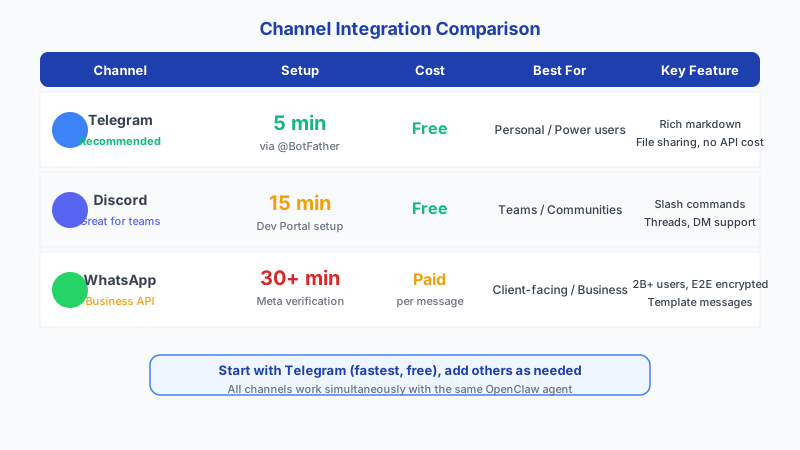
1. Setup Time and Difficulty Comparison
The biggest practical difference between channels is how long it takes to go from zero to a working bot. Telegram wins by a wide margin because BotFather handles everything in a 2-minute chat conversation. Discord requires creating an application in the Developer Portal, setting up bot permissions, and enabling privileged intents. WhatsApp requires Meta Business verification, which involves company documentation and can take days.
Setup Time Comparison:
┌─────────────┬──────────────┬───────────────────────────────────────────────────┐
│ Channel     │ Setup Time   │ Steps Required                                   │
├─────────────┼──────────────┼───────────────────────────────────────────────────┤
│ Telegram    │ 5 minutes    │ 1. Message @BotFather                            │
│             │              │ 2. /newbot → pick name → get token               │
│             │              │ 3. Add token to OpenClaw config                  │
├─────────────┼──────────────┼───────────────────────────────────────────────────┤
│ Discord     │ 15 minutes   │ 1. Create app in Developer Portal                │
│             │              │ 2. Create bot, copy token                        │
│             │              │ 3. Enable MESSAGE_CONTENT + Server Members       │
│             │              │    privileged intents                             │
│             │              │ 4. Generate invite URL with permissions           │
│             │              │ 5. Add bot to server                             │
│             │              │ 6. Add token to OpenClaw config                  │
├─────────────┼──────────────┼───────────────────────────────────────────────────┤
│ WhatsApp    │ 30+ minutes  │ 1. Create Meta Business account                  │
│             │              │ 2. Set up WhatsApp Business API                  │
│             │              │ 3. Verify business (can take days)               │
│             │              │ 4. Configure webhook URL                         │
│             │              │ 5. Set up message templates for outbound         │
│             │              │ 6. Add credentials to OpenClaw config            │
└─────────────┴──────────────┴───────────────────────────────────────────────────┘
2. API Costs and Rate Limits
Telegram and Discord bot APIs are completely free with no per-message charges. WhatsApp Business API charges per conversation window (a 24-hour session), with costs varying by country and conversation type. This makes WhatsApp significantly more expensive to operate at scale.
WhatsApp Business API switched to per-message pricing in July 2025. Marketing messages cost $0.025-$0.14 depending on the destination country. Service and utility messages sent within a 24-hour customer-initiated window are completely free. Authentication messages (OTPs, verification codes) cost $0.02-$0.08 per message. This pricing model favors reactive support bots over proactive outreach.
API Costs:
┌─────────────┬──────────────────────┬────────────────────────────────────────┐
│ Channel     │ Per-Message Cost     │ Notes                                 │
├─────────────┼──────────────────────┼────────────────────────────────────────┤
│ Telegram    │ FREE                 │ No charges for bot messages            │
│ Discord     │ FREE                 │ No charges for bot messages            │
│ WhatsApp    │ $0.005-0.08/convo    │ Varies by country + conversation type │
│             │                      │ Business-initiated: higher cost        │
│             │                      │ User-initiated: lower cost             │
└─────────────┴──────────────────────┴────────────────────────────────────────┘

Rate Limits:
┌─────────────┬──────────────────────┬────────────────────────────────────────┐
│ Channel     │ Rate Limit           │ Practical Impact                      │
├─────────────┼──────────────────────┼────────────────────────────────────────┤
│ Telegram    │ 30 msg/sec global    │ Plenty for personal/small team use    │
│             │ 1 msg/sec per chat   │ Throttle long responses               │
│ Discord     │ 50 req/sec global    │ Very generous for bot usage           │
│             │ 5 msg/5sec per chan  │ Burst-friendly                        │
│ WhatsApp    │ Varies by tier       │ New accounts: 250 convos/day          │
│             │                      │ Scaled accounts: 100K+/day            │
└─────────────┴──────────────────────┴────────────────────────────────────────┘
Try DoneClaw free for 7 days — cancel anytime
Full access during your trial. No credit card charged until day 8. Cancel from the Stripe portal with one click.
Try Free for 7 Days3. OpenClaw Configuration for Each Channel
Each channel uses different keys in the OpenClaw configuration file. Here are the exact config blocks you need for each one.
// Telegram config (simplest)
{
  "channels": {
    "telegram": {
      "token": "7123456789:AAHxxxxxxxxxxxxxxxxxxxxxxxxxxxxx",
      "allowedUsers": ["your_telegram_username"]
    }
  }
}
// Discord config (requires privileged intents enabled in portal)
{
"channels": {
"discord": {
"token": "MTIzNDU2Nzg5MDEyMzQ1Njc4OQ.xxxxxx.xxxxxxxx",
"dm": {
"enabled": true,
"policy": "allowlisted"
}
}
}
}// WhatsApp config (requires Meta Business verification)
{
"channels": {
"whatsapp": {
"accessToken": "EAAxxxxxxxxxxxxxxxxxxxxxxxx",
"phoneNumberId": "123456789012345",
"verifyToken": "your-webhook-verify-token"
}
}
}4. Feature Differences That Matter
Telegram supports inline keyboards, rich formatting (Markdown/HTML), file sharing up to 2GB, and group/channel bots. It also supports long messages up to 4096 characters per message. The bot privacy mode lets you control whether bots see all group messages or only commands.
Discord supports threaded conversations, voice channels, role-based permissions, and rich embeds with colors and images. Messages are limited to 2,000 characters (4,000 with Nitro). Embeds have a 6,000 character total limit across all fields combined. The channel-based structure works well for team workflows where different topics get different channels.
Discord has 3 privileged gateway intents you must enable in the Developer Portal: Message Content (required for reading message text), Server Members (for member join/leave events), and Presence (for online/offline status). Your bot will disconnect with error 4014 if it requests an intent that is not enabled.
WhatsApp supports end-to-end encryption, media sharing, and the widest non-technical user base. But message templates are required for business-initiated outbound messages, and the API has stricter content policies. Messages are limited to 4096 characters.
5. Recommendation Matrix
Choose based on who will use the bot and how:
- Personal assistant for yourself: Telegram. Fastest setup, free, great bot support, works on all devices.
- Team or community: Discord. Channel-based organization, role permissions, thread support for async conversations.
- Customer-facing or non-technical users: WhatsApp. Widest reach (2B+ users), familiar interface, but higher cost and slower setup.
- Privacy-critical use: Telegram with secret chats, or WhatsApp for end-to-end encryption.
- Multi-channel: Start with Telegram, add others once stable. OpenClaw shares memory across all connected channels.
- What about Signal? Signal has no official bot API as of March 2026, making it not viable for production bot deployment. There are unofficial bridges (like signal-cli), but they require linking a real phone number and violate Signal's terms of service. If Signal adds bot support in the future, it would be a strong option for privacy-focused users.
Conclusion
For most OpenClaw users, start with Telegram. It takes 5 minutes, costs nothing, and has the best bot API. Add Discord for team workflows or WhatsApp for non-technical users once your core agent is stable. Running all three channels simultaneously works, but debug one at a time.
Skip the setup? DoneClaw deploys OpenClaw for you — $29/mo with 7-day free trial, zero configuration.
Try DoneClaw free for 7 days — cancel anytime
Full access during your trial. No credit card charged until day 8. Cancel from the Stripe portal with one click.
Try Free for 7 DaysFrequently asked questions
Which channel has the best bot API?
Telegram. It was designed bot-first with features like inline keyboards, webhook support, and a generous 30 msg/sec rate limit. Discord is a close second. WhatsApp is the most restrictive.
Can I run Telegram and Discord on the same OpenClaw instance?
Yes. Add both channel configs to your openclaw.json. The agent shares the same memory and skills across channels. Messages from Telegram and Discord land in the same conversation context.
Is WhatsApp worth the extra setup complexity?
Only if your users are on WhatsApp and not on Telegram or Discord. The Meta Business verification process and per-conversation costs make it the most expensive channel. For personal use, stick with Telegram.