Setup & Deployment
How to Connect OpenClaw to Telegram in 10 Minutes
8 min read · Updated 2026-02-19
By DoneClaw Team · We run managed OpenClaw deployments and write from hands-on production experience.
This openclaw telegram setup guide is designed for quick deployment: create a bot, connect credentials, test message flow, and harden basic security in one session.
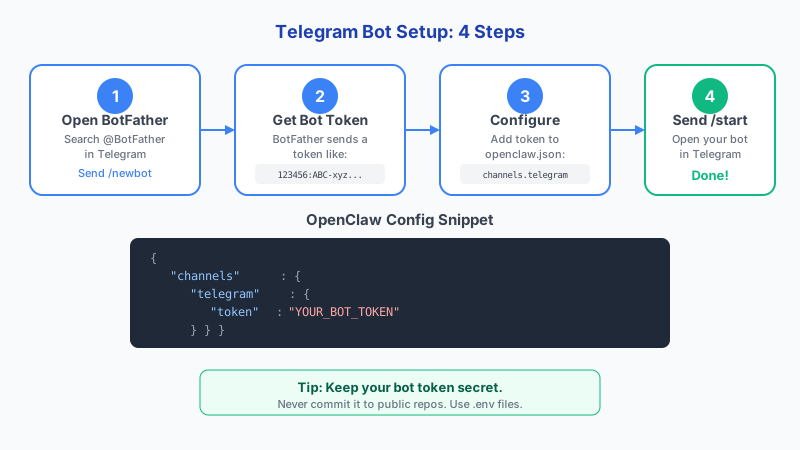
1. Create Your Telegram Bot
Open BotFather, create a new bot, and securely store the API token. Treat the token like a password because anyone with it can control your bot identity.
Set a clear bot name and username so users can identify it quickly in groups and direct messages.
BotFather supports 13 management commands beyond /newbot, including /setname, /setdescription, /setabouttext, /setuserpic, /setcommands, /deletebot, /setprivacy, /setjoingroups, and /setinline. Use /setcommands to define the slash commands your bot responds to, and /setprivacy to control whether the bot sees all group messages or only direct commands and replies.
- Use `/newbot` in BotFather
- Store token in a password manager
- Disable accidental token sharing in team chat
- Document bot ownership and recovery contact
# In Telegram, message @BotFather:
/newbot
# Enter bot name: My OpenClaw Agent
# Enter username: my_openclaw_bot
# Save the token: 7123456789:AAH...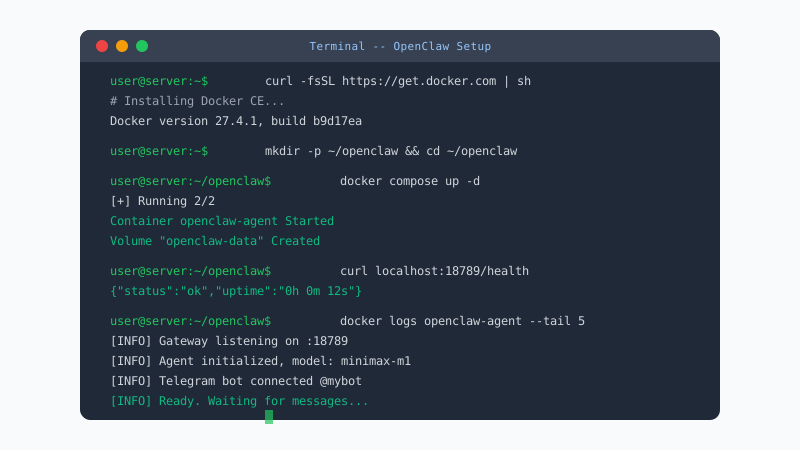
Skip 60 minutes of setup — deploy in 60 seconds
DoneClaw handles Docker, servers, security, and updates. Your OpenClaw agent is ready to chat in under a minute.
Deploy Now2. Add Telegram Credentials to OpenClaw
Add the bot token to your OpenClaw environment variables and restart the service. Confirm that startup logs report successful Telegram initialization.
Run a direct message test first. Group permissions and privacy mode can introduce noise if you validate group chat before basic routing works.
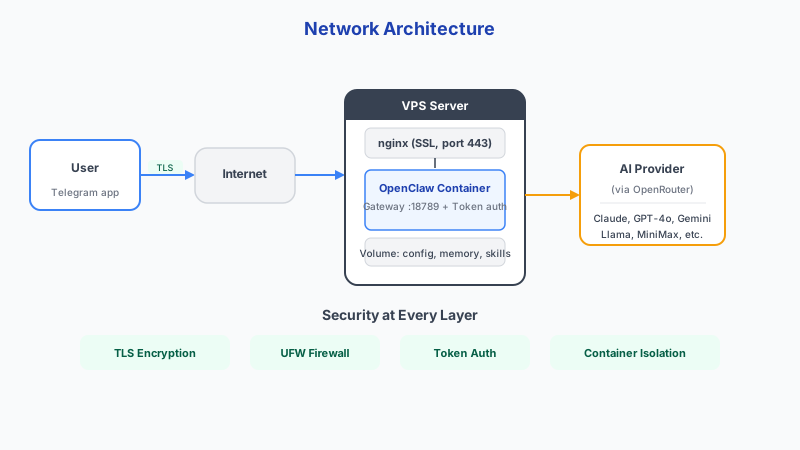
Telegram rate limits are generous: free bots can send 30 messages per second to different users, while paid bots handle up to 1,000 per second. Individual text messages are capped at 4,096 characters, captions at 1,024 characters, and file uploads and downloads at 50MB each. For delivery, webhooks are instant but require HTTPS with a valid SSL certificate and a publicly reachable URL. Long polling has a 1-30 second delay but needs no server infrastructure. Privacy mode is ON by default, meaning your bot only sees commands and direct replies in groups. If you toggle privacy mode, you must remove and re-add the bot to each group for the change to take effect.
- Update `.env` with Telegram bot token
- Restart services after secret changes
- Send a controlled test prompt from your own account
- Verify OpenClaw response appears in the same thread
{
  "channels": {
    "telegram": {
      "token": "7123456789:AAHxxxxx",
      "allowedUsers": ["your_telegram_username"]
    }
  }
}
3. Fix Common Telegram Integration Issues
Most failures are token typos, disabled bot permissions, or webhook conflicts. Check each of these before deep debugging.
If your bot receives messages but does not answer, inspect model API health and OpenClaw logs for timeout or auth errors.
- Rotate token immediately if leaked
- Check bot privacy mode for group replies
- Confirm outbound access to model provider APIs
- Set retry logic for transient API failures
Conclusion
Getting OpenClaw connected to Telegram comes down to three things: secure token handling, testing one message path before adding complexity, and checking logs when something goes wrong. Follow that approach and you will be live in minutes.
Skip the setup? DoneClaw deploys OpenClaw for you — $29/mo with 7-day free trial, zero configuration.
Skip 60 minutes of setup — deploy in 60 seconds
DoneClaw handles Docker, servers, security, and updates. Your OpenClaw agent is ready to chat in under a minute.
Deploy NowFrequently asked questions
Should I use polling or webhooks?
Polling is simpler for small installs. Webhooks are better for scale and lower latency once your HTTPS endpoint is stable.
Can one OpenClaw instance run multiple Telegram bots?
Yes, but keep configuration isolated and track each bot token separately to avoid accidental cross-routing.