Setup & Deployment
OpenClaw Setup Guide for Beginners (From Zero to Running Agent)
10 min read · Updated 2026-03-01
By DoneClaw Team · We run managed OpenClaw deployments and write from hands-on production experience.
This OpenClaw setup guide is written for people who have never deployed a server, never used Docker, and may not know what a container is. By the end, you will have a running AI agent that you can message from your phone. We will cover two paths: the fastest way using a managed service, and the self-hosted way using Docker.
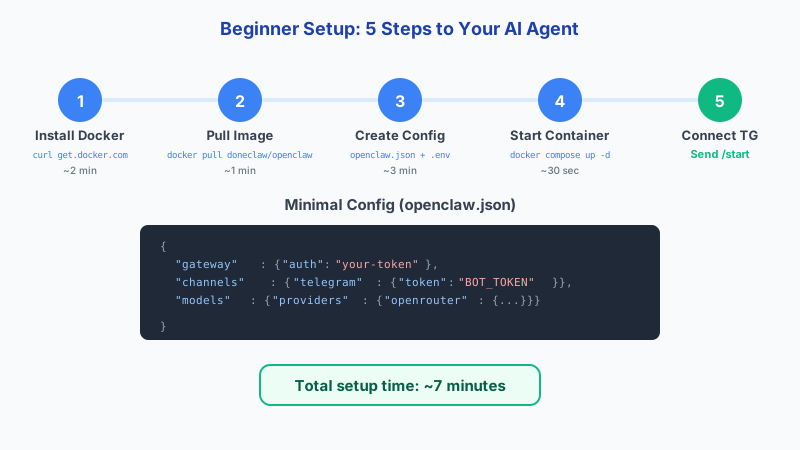
1. What You Need Before You Start
Before setting up OpenClaw, you need to make two decisions: which AI model you want to use and which messaging channel you want to connect. For the AI model, the easiest option is to sign up for an OpenRouter account, which gives you access to dozens of models through a single API key. For the messaging channel, Telegram is the simplest starting point because creating a bot takes less than two minutes.
You will also need to decide how you want to host your agent. If you want to skip all technical setup and just get a working agent, a managed service like DoneClaw is the fastest path. If you want to run everything yourself, you will need Docker installed on your computer or a VPS. Both paths are covered in this guide.
Regardless of which path you choose, have your OpenRouter API key and Telegram bot token ready before you begin. Getting these credentials takes five to ten minutes and is the same regardless of hosting method.
- An OpenRouter account and API key for model access
- A Telegram bot token from BotFather
- A DoneClaw account (managed path) or Docker installed (self-hosted path)
- About 15-30 minutes of setup time
# Step 1: Install Docker (Ubuntu/Debian)
curl -fsSL https://get.docker.com | sh
sudo usermod -aG docker $USER
# Log out and back in for group to take effect

# Step 2: Verify Docker works
docker run hello-world
2. The Fast Path: Managed Setup with DoneClaw
The fastest way to get a running OpenClaw agent is through DoneClaw. Sign up at doneclaw.com, choose a subscription plan, and your agent container is created automatically. The setup wizard walks you through connecting your Telegram bot by entering the bot token. Within a few minutes, you can send a message to your bot on Telegram and get a response from your agent.
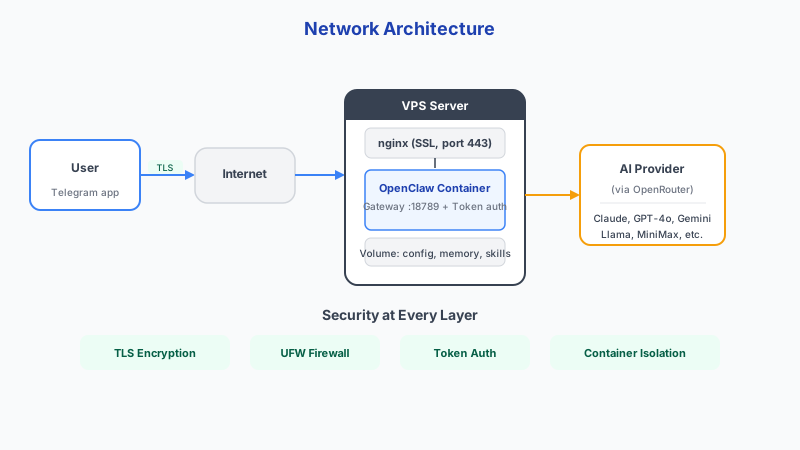
DoneClaw handles everything behind the scenes: the Docker container, networking, TLS, model routing, and automatic updates. You do not need to know what any of those things are. Your agent is accessible through Telegram immediately and through the DoneClaw dashboard for configuration changes.
This path is recommended for anyone who wants a working agent without learning server administration. You can always move to self-hosting later if you outgrow the managed service or want more control.
Skip 60 minutes of setup — deploy in 60 seconds
DoneClaw handles Docker, servers, security, and updates. Your OpenClaw agent is ready to chat in under a minute.
Deploy Now3. The Self-Hosted Path: Docker Setup
For the self-hosted path, start by installing Docker on your machine. On macOS and Windows, download Docker Desktop from the Docker website. On Linux, install the exact packages: docker-ce, docker-ce-cli, containerd.io, docker-buildx-plugin, and docker-compose-plugin. These replace the older docker.io and docker-compose packages. Verify the installation by running docker run --rm hello-world, which should print "Hello from Docker!" to confirm everything is working.
Next, create a directory for your OpenClaw project. Inside it, create a docker-compose.yml file that defines your agent container and a .env file that stores your API keys and bot token. The OpenClaw documentation provides a template for both files. Fill in your OpenRouter API key, Telegram bot token, and choose a model.
Run docker compose up -d to start your agent in the background. Send a test message to your Telegram bot. If everything is configured correctly, you should receive a response within a few seconds. If not, check the container logs with docker compose logs to identify the issue.
- Install Docker Desktop (macOS/Windows) or Docker Engine (Linux)
- Create a project directory with docker-compose.yml and .env
- Fill in your OpenRouter API key, bot token, and model choice
- Run docker compose up -d and test with a Telegram message
- Check logs with docker compose logs if something is not working
# Create project directory
mkdir ~/openclaw && cd ~/openclaw

# Create your .env file
echo "OPENROUTER_API_KEY=sk-or-v1-your-key" > .env
echo "OPENCLAW_GATEWAY_TOKEN=$(openssl rand -hex 32)" >> .env

# Start OpenClaw
docker run -d \
  --name openclaw-agent \
  --restart unless-stopped \
  -p 18789:18789 \
  --env-file .env \
  -v openclaw-data:/home/node/.openclaw \
  doneclaw/openclaw:latest

# Check it's running
docker logs openclaw-agent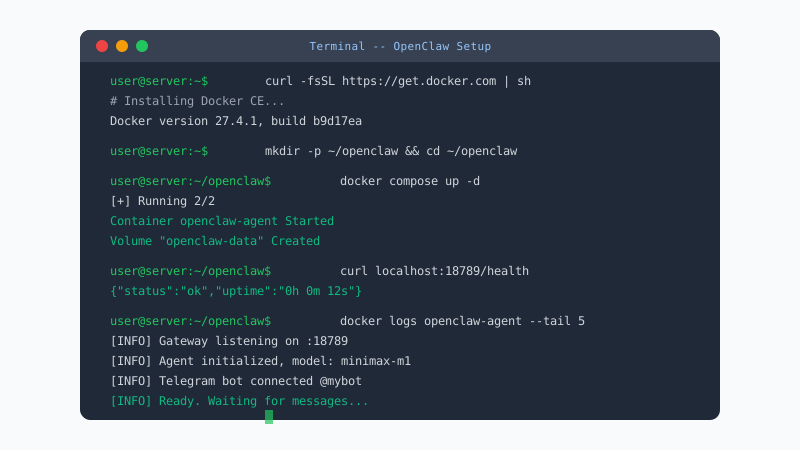
4. First Steps After Setup
Once your agent is responding to messages, spend a few minutes testing basic functionality. Send a few messages and verify the agent responds coherently. Ask it to remember something specific, then ask about it in a later message to confirm memory is working. Try different types of requests to get a feel for the model capabilities.
After basic testing, explore the configuration options. You can change the default model to something faster or more capable, adjust memory settings, or add a second channel like Discord. Make one change at a time and test after each change so you can identify any issues quickly.
The most common early problems are incorrect API keys, bot token issues, and model names that do not match what the provider expects. If your agent is not responding, the container logs will almost always tell you what went wrong. The four most frequent setup errors and their fixes: "permission denied" means you need to add your user to the docker group with sudo usermod -aG docker $USER, "port already in use" means another process is on that port (check with ss -tlnp | grep :18789), "no space left on device" is solved with docker system prune -a to reclaim disk space, and "network not found" requires creating the network with docker network create openclaw-net.
5. Choosing a Model
OpenClaw supports dozens of AI models through OpenRouter. For beginners, start with a model that balances quality and cost. Models from Anthropic, OpenAI, and Google offer strong general-purpose performance. Smaller open-source models like Llama or Mistral variants cost less per message but may be less capable for complex tasks.
You can change your model at any time without losing your agent memory or configuration. Many users start with a capable model to get comfortable, then switch to a cheaper model once they understand their usage patterns. OpenClaw also supports routing different types of requests to different models, but that is an advanced feature you can explore later.
Conclusion
Setting up OpenClaw does not require deep technical knowledge. The managed path through DoneClaw gets you running in minutes, and the self-hosted Docker path is approachable for anyone willing to follow step-by-step instructions. Start with the simplest path that meets your needs and expand from there.
Skip the setup? DoneClaw deploys OpenClaw for you — $29/mo with 7-day free trial, zero configuration.
Skip 60 minutes of setup — deploy in 60 seconds
DoneClaw handles Docker, servers, security, and updates. Your OpenClaw agent is ready to chat in under a minute.
Deploy NowFrequently asked questions
Do I need a credit card to try OpenClaw?
You need an OpenRouter account for model access, which may require payment information depending on the models you use. DoneClaw requires a subscription. There is no free trial, but the entry price is straightforward.
Can I set up OpenClaw on my phone?
You interact with your agent from your phone through Telegram or other messaging apps. The setup itself needs to be done from a computer, either through a web dashboard for managed hosting or a terminal for self-hosted Docker deployment.
What if I break something during setup?
With managed hosting, there is very little you can break. With self-hosted Docker, you can always delete the container and start fresh. Your configuration files are just text, so mistakes are easy to fix by editing them.
How much does it cost per month to run OpenClaw?
Self-hosted costs include a VPS at five to twenty dollars per month plus model API usage. Managed hosting through DoneClaw includes the infrastructure cost in the subscription price. Model API costs depend on how much you use the agent.