Security & Privacy
OpenClaw Security Hardening Checklist (Stop Exposing Port 18789)
9 min read · Updated 2026-02-24
By DoneClaw Team · We run managed OpenClaw deployments and write from hands-on production experience.
This openclaw security hardening guide focuses on practical controls that stop common compromises, starting with one rule: do not expose internal ports directly to the public internet.
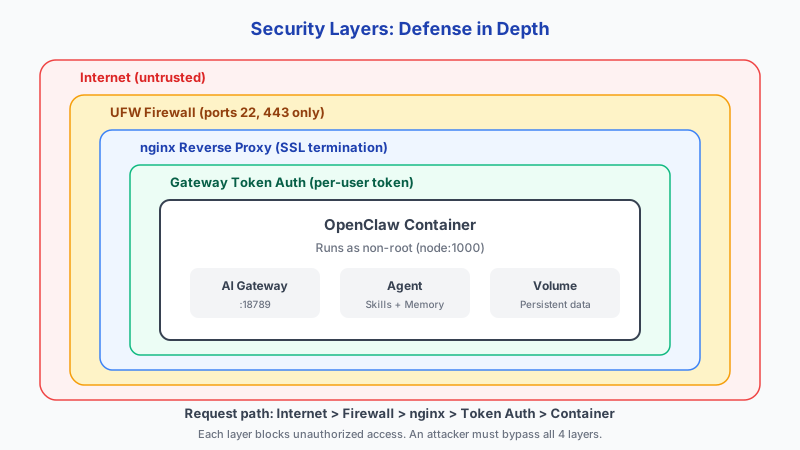
1. Network Hardening First
Close unnecessary inbound ports and place OpenClaw behind a trusted access layer. Public exposure of internal management ports is one of the fastest paths to compromise.
Use allowlists, VPN overlays, or zero-trust tunnels for administrative access.
Recommended fail2ban configuration for SSH protection: maxretry: 3, bantime: 1 hour, findtime: 10 minutes. This blocks brute-force attackers after 3 failed attempts within 10 minutes and bans them for a full hour. Install with apt install fail2ban and enable the sshd jail.
- Disable direct public access to internal service ports
- Use firewall default-deny inbound policy
- Restrict SSH by key and trusted source ranges
- Terminate TLS at a hardened reverse proxy
# Lock down firewall - allow only SSH and HTTPS
sudo ufw default deny incoming
sudo ufw default allow outgoing
sudo ufw allow 22/tcp
sudo ufw allow 443/tcp
sudo ufw enable

# Verify no extra ports are open
sudo ufw status verbose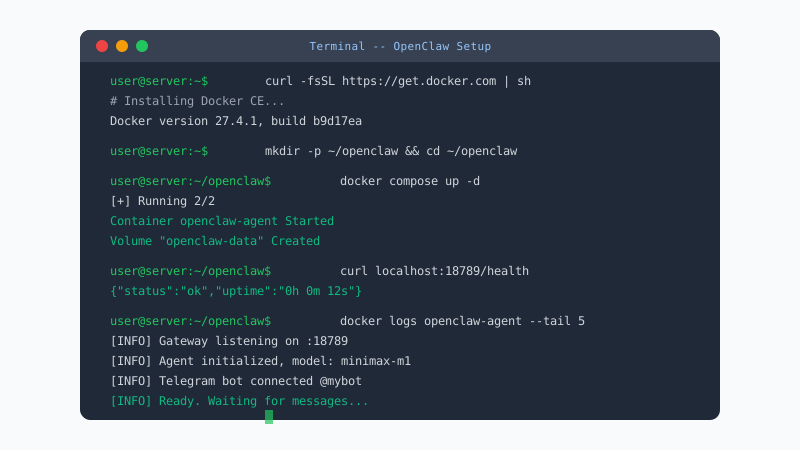
Pre-hardened security, zero configuration
Your OpenClaw container runs in an isolated environment with automatic security updates, encrypted storage, and network isolation.
Get Started Securely2. Secrets and Runtime Controls
Store secrets in environment injection systems or secret managers, not plaintext repos. Rotate tokens regularly and invalidate leaked credentials immediately.
Essential security headers for your reverse proxy: HSTS (Strict-Transport-Security) to force HTTPS, CSP (Content-Security-Policy) to prevent XSS, X-Frame-Options: DENY to block clickjacking, X-Content-Type-Options: nosniff to prevent MIME-sniffing, Referrer-Policy: strict-origin-when-cross-origin, and Permissions-Policy to disable camera, microphone, and geolocation access.
Docker daemon hardening in /etc/docker/daemon.json: set "icc": false to disable inter-container communication, "userns-remap": "default" for user namespace isolation, and "no-new-privileges": true to prevent privilege escalation. The CIS Docker Benchmark provides 100+ recommendations across 7 categories (host, daemon, images, containers, runtime, security, and swarm). Let's Encrypt certificates auto-renew via the certbot systemd timer that runs twice daily.
Apply resource limits to prevent runaway tasks from degrading system safety and availability.
# /etc/nginx/sites-available/openclaw
server {
    listen 443 ssl;
    server_name agent.yourdomain.com;

    ssl_certificate /etc/letsencrypt/live/agent.yourdomain.com/fullchain.pem;
    ssl_certificate_key /etc/letsencrypt/live/agent.yourdomain.com/privkey.pem;

    location / {
        proxy_pass http://127.0.0.1:18789;
        proxy_set_header Host $host;
        proxy_set_header X-Forwarded-For $remote_addr;
    }
}
3. Detection and Recovery
Hardening is incomplete without visibility. Keep structured logs, failure alerts, and tested backups. Security posture includes recovery speed after incidents.
Run quarterly restore drills so backup success is verified, not assumed.
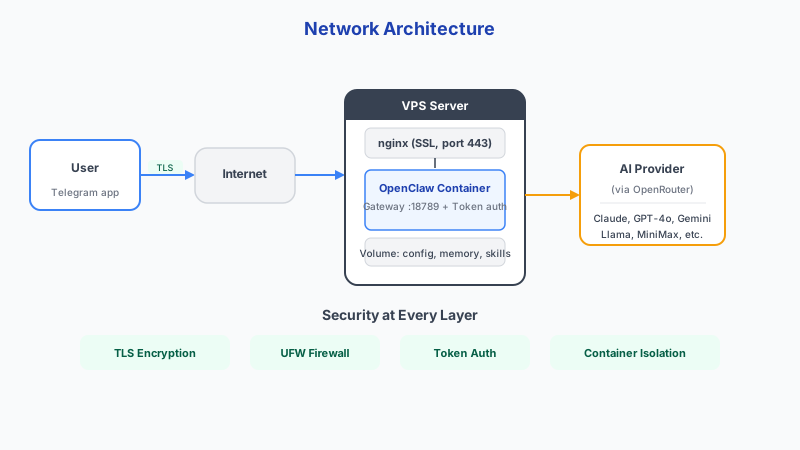
Conclusion
Security hardening is about four things: close network exposure, reduce privilege to the minimum, monitor continuously, and verify that your recovery process actually works. Start with the firewall and work your way down the checklist.
Skip the setup? DoneClaw deploys OpenClaw for you — $29/mo with 7-day free trial, zero configuration.
Pre-hardened security, zero configuration
Your OpenClaw container runs in an isolated environment with automatic security updates, encrypted storage, and network isolation.
Get Started SecurelyFrequently asked questions
Why is exposing port 18789 risky?
Directly exposing internal control surfaces increases attack surface and enables opportunistic scans to find and probe your instance.
What is the quickest first hardening step?
Move access behind Tailscale or a secure reverse proxy and close all unnecessary inbound ports.