Cost & Optimization
5 Ways to Cut Your OpenClaw API Bill by 80%
7 min read · Updated 2026-02-20
By DoneClaw Team · We run managed OpenClaw deployments and write from hands-on production experience.
This openclaw reduce token cost save money playbook focuses on routing, prompt hygiene, caching, and control policies that reduce cost while preserving output quality.
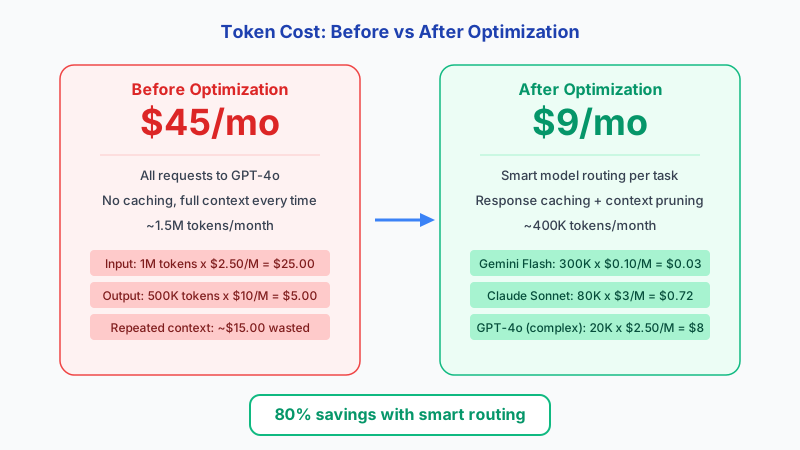
1. Route by Task Difficulty
Do not send every prompt to your most expensive model. Classify tasks by complexity and set default routing to low-cost models for routine operations.
Escalate only when confidence is low or when the task has clear business impact.
{
  "agents": {
    "defaults": {
      "model": {
        "primary": "openrouter/minimax/minimax-m1"
      }
    }
  }
}
2. Shrink Prompt and Context Size
Token waste often comes from oversized context windows. Summarize long histories and inject only relevant memory snippets for the current task.
Use compact system prompts and avoid repeating static instructions in every call when your framework supports reusable templates.
For advanced prompt compression, LLMLingua achieves up to 20x compression ratios on input prompts. LongLLMLingua reduces cost by 75% while actually improving RAG accuracy by 21.4%. OpenRouter supports fallback routing via a models array with route set to fallback, which automatically retries with the next model on failure. Use the tiktoken library for accurate token counting before sending requests to avoid surprises on your bill.
Before optimization:
  System prompt: 800 tokens (verbose instructions repeated every call)
  Memory context: 2,000 tokens (full conversation history injected)
  User message: 200 tokens
  Total per request: 3,000 tokens

After optimization:
  System prompt: 200 tokens (concise, reusable template)
  Memory context: 500 tokens (only relevant snippets)
  User message: 200 tokens
  Total per request: 900 tokens → 70% reduction in input tokens
All of this for $29/mo, unlimited usage
No per-message limits, no token quotas, no surprise charges. Your dedicated OpenClaw agent runs 24/7 at full speed.
Start Free Trial3. Add Caching and Guardrails
Cache deterministic results for repeated queries and add limits for retries, tool loops, and max response length. These controls prevent runaway spend.
Example: a support agent handling 50,000 messages/month where 70% are repeated questions. Before caching: 50,000 messages at $0.003/msg average = $150/mo. After caching the 35,000 repeated queries: 15,000 unique messages x $0.003 = $45/mo + 35,000 cached at $0 = $45/mo total. Savings: $105/mo (70%).
The numbers behind caching strategies: exact-match caching typically hits about 18% of requests. Semantic caching using embedding similarity achieves 61-68% hit rates, a 3.7x improvement. Production deployments report up to 73% cost reduction with semantic caching. For batch workloads, OpenAI Batch API offers 50% off with results within 24 hours, DeepSeek provides 50-75% off-peak discounts, and Gemini Pro batch processing is 50% off.
- Cache FAQ-like prompts
- Cap retries and loop depth
- Set response token ceilings
- Review daily outlier prompts
- Use local models for draft-first workflows
4. Advanced: Model Router Configuration
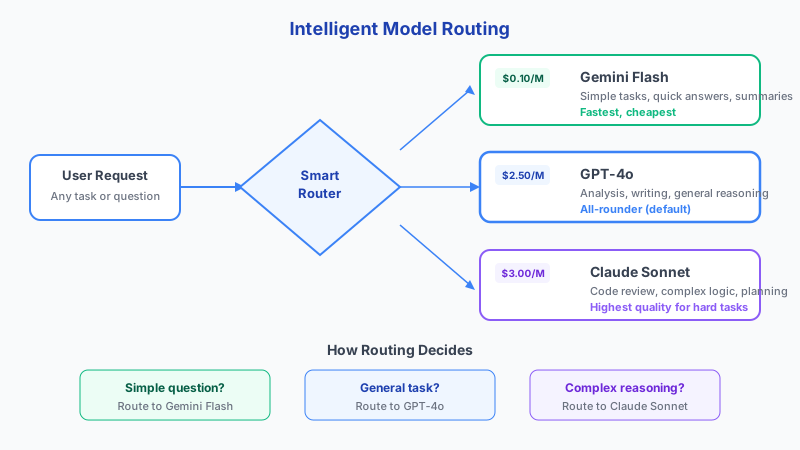
OpenClaw supports multi-model routing through its provider configuration, allowing you to automatically direct different types of requests to different models based on task complexity. The basic setup involves defining multiple model providers in your openclaw.json config and setting routing rules that match prompt characteristics to the appropriate model tier. Simple classification tasks, FAQ responses, and data extraction can route to fast and cheap models like Gemini Flash or Llama 3, while complex reasoning, code generation, and multi-step planning route to premium models like Claude or GPT-4.
To configure model routing, define your model tiers in the providers section of your OpenClaw configuration and set the primary model to your cheapest acceptable option. Then use agent-level overrides or skill-specific model settings to escalate particular workflows to higher-tier models. For example, your email triage skill might use a $0.10 per million token model for classification, while your research synthesis skill uses a $3 per million token model for quality. This tiered approach typically reduces total API spend by 60 to 80 percent compared to running everything on a single premium model.
Monitor your routing effectiveness by reviewing the usage logs that OpenClaw generates for each model. Look for tasks that consistently produce poor results on cheap models and consider upgrading just those specific workflows. Conversely, identify premium model usage that could be downgraded without quality loss. This continuous optimization loop is where the real savings compound over time, because your routing rules get smarter as you learn which tasks genuinely need expensive models and which are wasting tokens on unnecessary capability.
Conclusion
Most users can cut their API bill significantly within the first week by combining model routing with tighter prompt controls and basic caching. Start with the lowest-cost model that meets your quality bar and escalate only when needed.
Skip the setup? DoneClaw deploys OpenClaw for you — $29/mo with 7-day free trial, zero configuration.
All of this for $29/mo, unlimited usage
No per-message limits, no token quotas, no surprise charges. Your dedicated OpenClaw agent runs 24/7 at full speed.
Start Free TrialFrequently asked questions
Will cheaper models hurt output quality?
Not for many repetitive tasks. Keep premium models only for high-complexity workflows where quality materially affects outcomes.
How fast can I see savings?
In many setups, you can measure meaningful reduction within the first week after routing and context-size controls go live.