Setup & Deployment
How to Set Up OpenClaw on a Raspberry Pi (Step-by-Step)
9 min read · Updated 2026-02-18
By DoneClaw Team · We run managed OpenClaw deployments and write from hands-on production experience.
This openclaw raspberry pi setup walkthrough shows how to run your own OpenClaw agent on low-cost hardware with stable performance and predictable monthly costs.
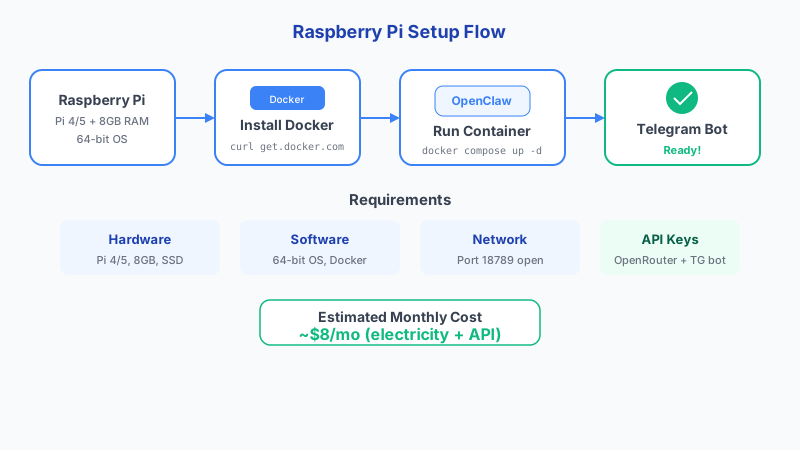
1. Hardware and Software Prerequisites
For a smooth OpenClaw experience, use a Raspberry Pi 4 (8GB) or Raspberry Pi 5, a fast microSD card or SSD, and Raspberry Pi OS 64-bit. OpenClaw depends on Docker, so a 64-bit environment is important.
If you plan to run memory-heavy models locally, attach an SSD and keep at least 20GB free. For remote API models, the Pi mostly handles orchestration and messaging, so RAM pressure is lower.
Power consumption on the Pi 5 is remarkably low: 2.6W idle, 6.8W under load, and up to 11.6W with an NVMe drive attached. At US average electricity rates, that translates to roughly $0.33 to $0.87 per month to run 24/7. Thermal management follows a predictable curve: the fan activates at 60 degrees C, soft throttling begins at 80 degrees C, and hard throttling kicks in at 85 degrees C. Active cooling is essential for sustained workloads.
Storage performance matters more than most guides suggest. A microSD card delivers approximately 90 MB/s read and 30 MB/s write, while an NVMe SSD via the Pi 5 M.2 HAT reaches 858 MB/s read and 514 MB/s write. Boot times drop from 21 seconds on microSD to 13-15 seconds on NVMe. For cases, the Official Active Cooler costs around $5, the Argon ONE V5 runs $35, and the Argon V5 with M.2 slot is $48. A typical Docker container running a Node.js application like OpenClaw uses 150-300MB of RAM.
- Raspberry Pi 4/5 with reliable power supply
- Raspberry Pi OS 64-bit fully updated
- Docker + Docker Compose plugin installed
- Static local IP or DHCP reservation for easier network access
Skip 60 minutes of setup — deploy in 60 seconds
DoneClaw handles Docker, servers, security, and updates. Your OpenClaw agent is ready to chat in under a minute.
Deploy Now2. Install OpenClaw on Raspberry Pi
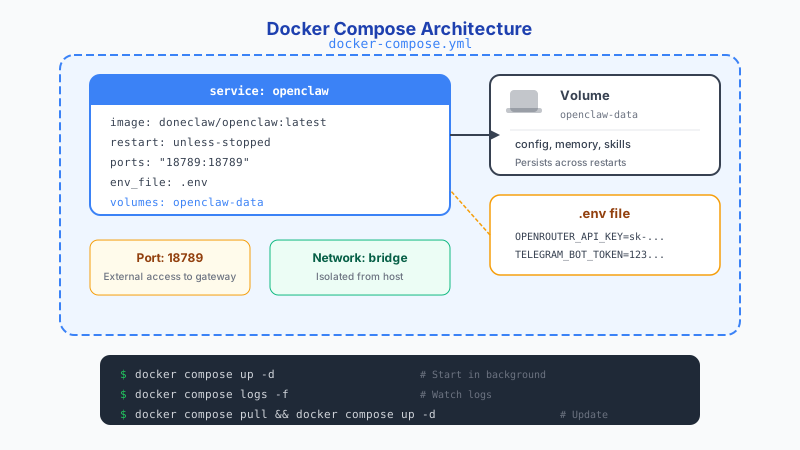
Update packages first, install Docker, and verify Docker starts at boot. Then clone your OpenClaw configuration, create the `.env` file, and launch services with Compose.
Start with one channel and one model. After your baseline is stable, add more channels, skills, and cron jobs. This keeps debugging simple and avoids stacking unknowns.
- Run system updates and reboot once
- Install Docker and add your user to the docker group
- Create OpenClaw env variables for API keys and channel tokens
- Run `docker compose up -d` and confirm container health
# Update system and install Docker
sudo apt update && sudo apt upgrade -y
curl -fsSL https://get.docker.com | sh
sudo usermod -aG docker $USER

# Create OpenClaw directory and compose file
mkdir -p ~/openclaw && cd ~/openclaw

# docker-compose.yml
cat << 'EOF' > docker-compose.yml
services:
  openclaw:
    image: doneclaw/openclaw:latest
    container_name: openclaw-agent
    restart: unless-stopped
    ports:
      - "18789:18789"
    volumes:
      - openclaw-data:/home/node/.openclaw
    env_file: .env

volumes:
  openclaw-data:
EOF

docker compose up -d
docker compose logs -f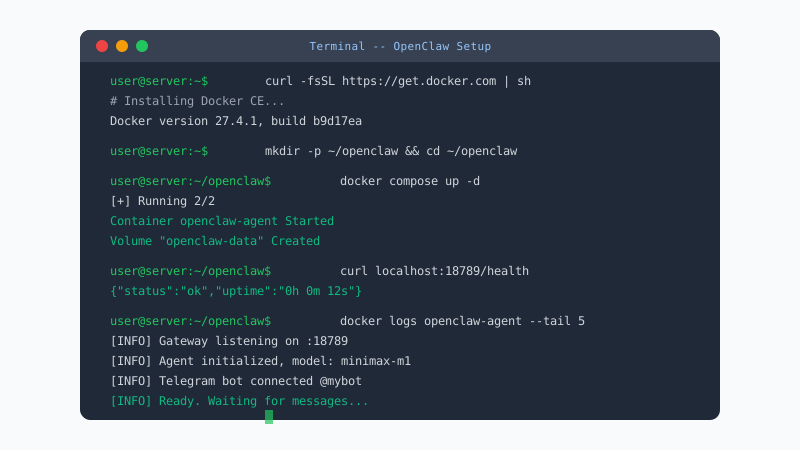
3. Performance and Reliability Tuning
Use lightweight models for default workflows and reserve larger models for high-value tasks. This improves response time and prevents thermal throttling on sustained workloads.
Set up container restart policies, a simple heartbeat check, and log rotation. These three controls prevent most unattended failures on home lab setups.
- Enable active cooling for sustained load
- Limit concurrent jobs to avoid memory spikes
- Monitor CPU temperature and memory usage weekly
- Back up your OpenClaw config and memory volume regularly
# Check CPU temperature
vcgencmd measure_temp

# Monitor memory usage
free -h

# Set up auto-restart on failure
docker update --restart=unless-stopped openclaw-agent
Conclusion
A Raspberry Pi can run OpenClaw around the clock for personal automation at minimal cost. Start with one channel and one model, get a stable baseline, then expand from there.
Skip the setup? DoneClaw deploys OpenClaw for you — $29/mo with 7-day free trial, zero configuration.
Skip 60 minutes of setup — deploy in 60 seconds
DoneClaw handles Docker, servers, security, and updates. Your OpenClaw agent is ready to chat in under a minute.
Deploy NowFrequently asked questions
Can Raspberry Pi 3 run OpenClaw?
It can run very light workloads, but Pi 4/5 is strongly recommended for responsiveness, memory headroom, and long-running stability.
Do I need a static public IP for remote access?
No. Most users should use Tailscale or another zero-trust network instead of exposing ports directly to the public internet.