Setup & Deployment
OpenClaw + Ollama: Run Your AI Assistant for $0/Month
9 min read · Updated 2026-02-19
By DoneClaw Team · We run managed OpenClaw deployments and write from hands-on production experience.
The openclaw ollama local model free stack lets you run many daily tasks without per-token charges, using OpenClaw for orchestration and Ollama for local inference.
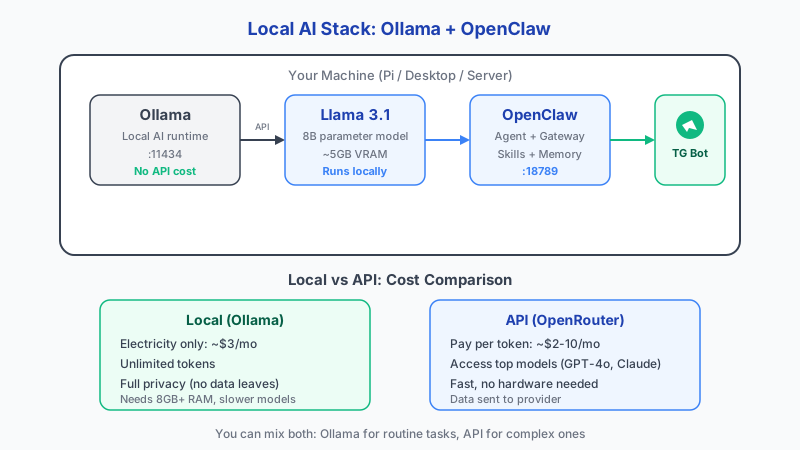
1. Decide Your Local Model Strategy
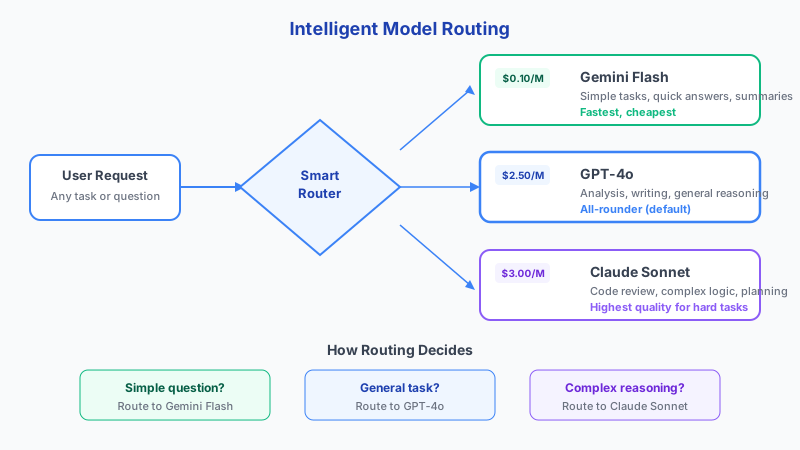
Use local models for repetitive, low-risk tasks such as draft replies, classification, and short summaries. Reserve premium cloud models for complex reasoning only.
This hybrid routing pattern reduces cost without sacrificing quality where it matters.
Here is what to expect from popular local models: Llama 3.1 8B is 4.7GB and needs 5-6GB RAM, best for general chat. Llama 3.1 70B is 40GB and needs 48GB+ RAM for complex reasoning. Mistral 7B at 4.1GB needs 5-6GB RAM and excels at fast responses. Phi-3 Mini is only 2.3GB needing 3-4GB RAM, ideal for resource-limited devices. Gemma 2 9B at 5.5GB needs 7-8GB RAM and is strong at instruction following.
Inference speed varies dramatically by hardware: an M1/M2 Mac runs 8B models at 15-28 tokens per second. An RTX 3060 pushes 7B models at 45-55 tokens per second. A Raspberry Pi 5 manages 3-6 tokens per second on 3B models, and 0.7-3 tokens per second on 7B models, which is generally too slow for interactive use.
- Local first for routine automation
- Cloud fallback for hard reasoning tasks
- Track latency and output quality by task type
- Keep prompts short for local model stability
Skip 60 minutes of setup — deploy in 60 seconds
DoneClaw handles Docker, servers, security, and updates. Your OpenClaw agent is ready to chat in under a minute.
Deploy Now2. Install Ollama and Pull Efficient Models
Install Ollama on the same host or trusted LAN endpoint. Pull compact models that fit your hardware envelope, then benchmark response speed before production use.
Model size should match available RAM and CPU/GPU budget. Over-sized models cause slow responses and queue buildup.
Quantization is key to fitting models in limited RAM. Q4_K_M is the sweet spot: 75% smaller than full precision with 95% quality retention. Q5_K_M is 68% smaller with 97% quality. Q8_0 is 50% smaller with 99% quality. Always start with Q4_K_M unless you have RAM to spare.
Important caveats: Ollama defaults to a 2,048 token context window. Override this with the num_ctx parameter in your model configuration for longer conversations. Also, Docker Desktop on Mac has no GPU passthrough. Use a native Ollama install to take advantage of Apple Silicon acceleration rather than running Ollama inside Docker.
- Install Ollama service and verify local endpoint
- Pull one small and one medium model for A/B tests
- Enable automatic Ollama service restart
- Pin known-good model versions for reproducibility
# Install Ollama
curl -fsSL https://ollama.com/install.sh | sh

# Pull a model (7B runs well on 16GB RAM)
ollama pull llama3.1:8b

# Verify it's running
ollama list
curl http://localhost:11434/api/tags
{
"models": {
"providers": {
"ollama": {
"api": "openai-completions",
"baseUrl": "http://host.docker.internal:11434/v1"
}
}
},
"agents": {
"defaults": {
"model": {
"primary": "ollama/llama3.1:8b"
}
}
}
}
3. Connect OpenClaw to Ollama
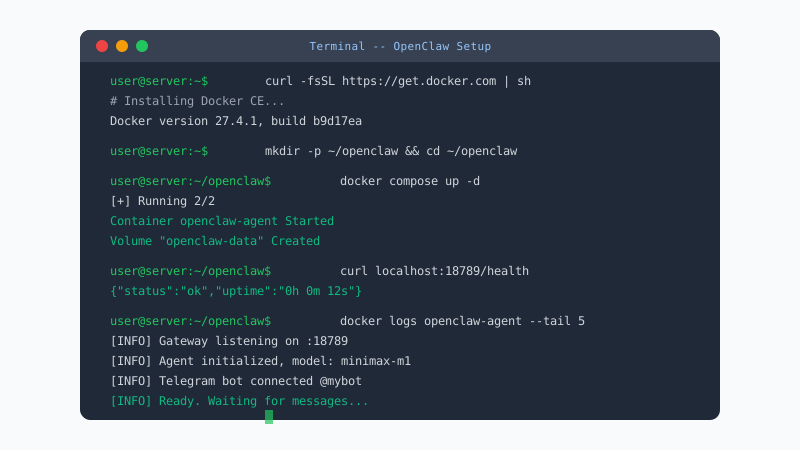
Set OpenClaw model endpoint variables to your Ollama host and validate with a test prompt through your normal channel (Telegram, Discord, or web).
Add guardrails: timeout limits, fallback routes, and max input size. Local inference is powerful, but it still needs production controls.
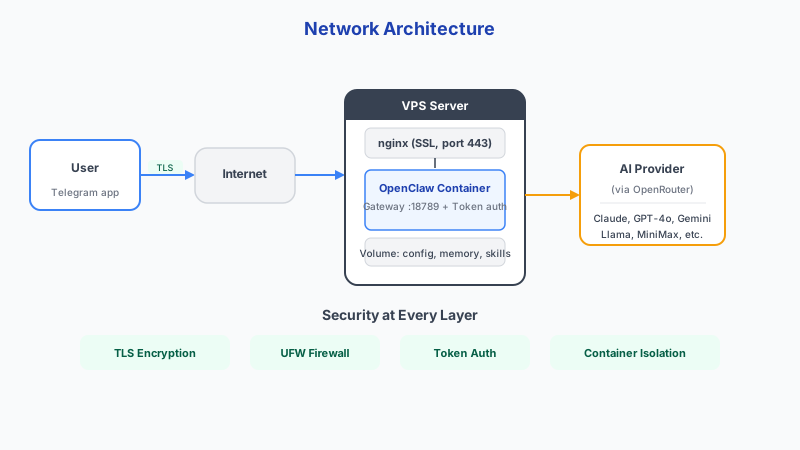
- Use private networking between OpenClaw and Ollama
- Configure fallback model for failures
- Limit request size to protect local memory
- Monitor queue time under peak load
Conclusion
Pairing OpenClaw with Ollama can cut recurring model costs dramatically. You still pay for hardware and power, but per-token expenses drop to near zero for most daily tasks.
Skip the setup? DoneClaw deploys OpenClaw for you — $29/mo with 7-day free trial, zero configuration.
Skip 60 minutes of setup — deploy in 60 seconds
DoneClaw handles Docker, servers, security, and updates. Your OpenClaw agent is ready to chat in under a minute.
Deploy NowFrequently asked questions
Is $0/month truly possible?
Token costs can be near zero with local inference, but hardware, electricity, and maintenance are still real costs.
Does local inference reduce privacy risk?
Yes. Keeping prompts on your own infrastructure reduces third-party exposure, especially for sensitive internal workflows.