Use Cases & Practical
OpenClaw Memory System: How Persistent Context Actually Works
9 min read · Updated 2026-02-27
By DoneClaw Team · We run managed OpenClaw deployments and write from hands-on production experience.
Understanding openclaw memory system how it works helps you design better prompts, reduce token waste, and improve long-term task continuity.
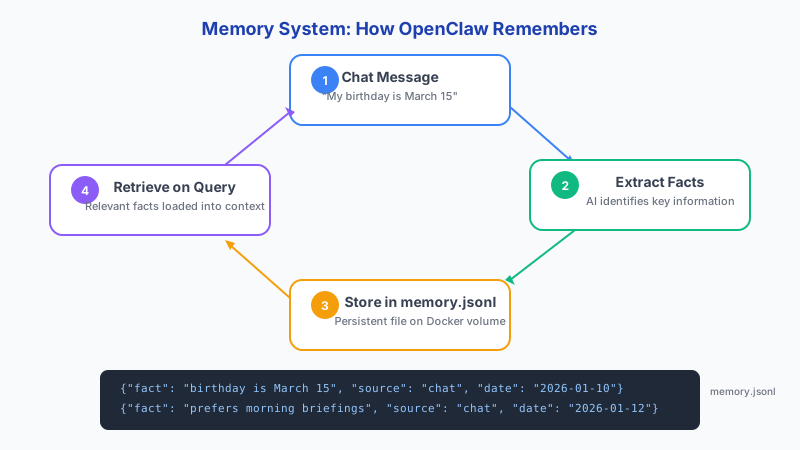
1. Memory Layers and File Structure
OpenClaw memory lives in the ~/.openclaw/memory/ directory inside the container. Conversation history is stored in JSONL format (one JSON object per line) with timestamp, role, and content fields. Different memory layers serve different retrieval goals: short-term conversation context for the current session, and persistent stored facts and summaries for long-term recall.
Do not treat all past messages as equally important. OpenClaw retrieves relevant snippets based on the current conversation context, not the entire history.
# Memory directory structure inside the container
ls -la ~/.openclaw/memory/
# memory.jsonl       — conversation history (JSONL format)
# summaries/         — extracted facts and summaries
# embeddings/        — vector indices for retrieval

# Storage format (each line is a JSON object):
# {"ts":"2026-02-27T08:15:00Z","role":"user","content":"Schedule a meeting for Friday"}
# {"ts":"2026-02-27T08:15:02Z","role":"assistant","content":"Meeting scheduled for Friday at 10am"}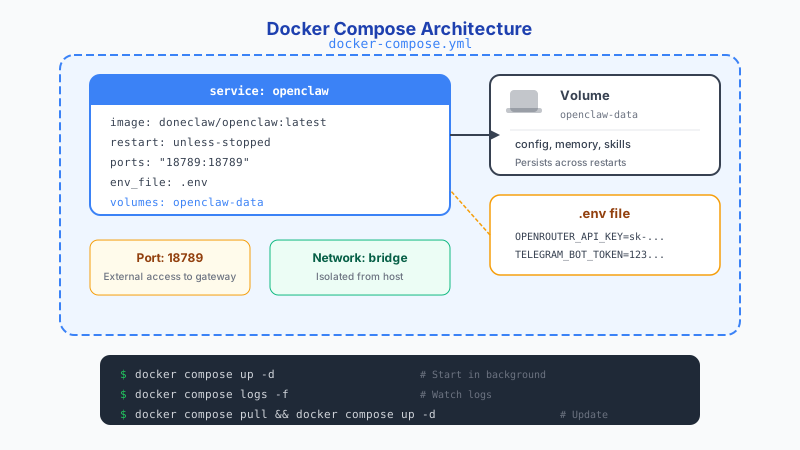
2. Retrieval and Context Injection
On each request, OpenClaw selects relevant memory snippets and injects them into the prompt. Good retrieval reduces hallucinations and repeated user clarification loops. Poor retrieval increases both latency and token spend. For vector storage, ChromaDB is completely free and open source (the Rust rewrite is 4x faster than the Python version), while managed options like Qdrant ($27-102/month) and Weaviate ($25/month) offer hosted convenience.
RAG architecture has evolved beyond simple retrieve-and-generate. Basic RAG does straightforward retrieval plus generation. Adaptive RAG routes between retrieval strategies based on query type. Agentic RAG lets the agent decide whether retrieval is even needed. Corrective RAG scores retrieved documents and falls back to web search if quality is low. Each pattern trades complexity for accuracy.
- Store concise structured summaries
- Tag memory by project/user/topic
- Expire stale context automatically
- Review retrieval quality with real transcripts
Get your own AI agent today
Persistent memory, channel integrations, unlimited usage. DoneClaw deploys and manages your OpenClaw instance so you just chat.
Get Started3. Inspecting, Backing Up, and Clearing Memory
Because memory is stored as files in a Docker volume, you can inspect, back up, and clear it with standard shell commands. This is one of the key advantages of self-hosted agents: full visibility into what your agent remembers.
# View the last 20 memory entries
docker exec openclaw-agent cat ~/.openclaw/memory/memory.jsonl | tail -20

# Count total memory entries
docker exec openclaw-agent wc -l ~/.openclaw/memory/memory.jsonl

# Back up memory to your host machine
docker cp openclaw-agent:/home/node/.openclaw/memory/ ~/openclaw-backup/

# Clear all memory (fresh start)
docker exec openclaw-agent rm ~/.openclaw/memory/memory.jsonl

# Clear memory and restart
docker exec openclaw-agent rm -rf ~/.openclaw/memory/*
docker restart openclaw-agent
4. Limits and Best Practices
Persistent memory is useful, but unbounded retention creates noise and privacy risk. Apply retention windows and explicit deletion controls. Memory quality depends on curation. Regular cleanup beats infinite accumulation. Be aware of the "Lost in the Middle" problem: LLMs struggle with information placed in the middle of long contexts, with accuracy dropping to 76-82% for middle-positioned content versus 95%+ for content at the beginning or end. Even 200K context models become unreliable beyond roughly 130K tokens.
Consider setting up periodic memory compaction: summarize old conversations into key facts and delete the raw history. This keeps retrieval fast and token costs low while preserving important context. Self-attention scales quadratically with sequence length — doubling context length quadruples compute cost. Techniques like KVzip achieve 3-4x KV cache compression for long contexts, but the most effective strategy is keeping your retrieved context concise and placing the most important information at the start or end of the prompt.
Conclusion
Understanding how memory works lets you tune context quality, reduce hallucinations, and keep token costs under control. Curate your memory deliberately, back it up regularly, and set retention policies so old noise does not crowd out useful context.
Skip the setup? DoneClaw deploys OpenClaw for you — $29/mo with 7-day free trial, zero configuration.
Get your own AI agent today
Persistent memory, channel integrations, unlimited usage. DoneClaw deploys and manages your OpenClaw instance so you just chat.
Get StartedFrequently asked questions
Should I keep all memory forever?
Not usually. Retention and relevance policies improve quality and reduce both privacy risk and token cost.
Why does memory sometimes feel inconsistent?
Inconsistency usually comes from retrieval settings, weak tagging, or noisy historical context overshadowing relevant facts.