Use Cases & Practical
Using OpenClaw as a Personal Email Assistant (Gmail/IMAP)
10 min read · Updated 2026-02-26
By DoneClaw Team · We run managed OpenClaw deployments and write from hands-on production experience.
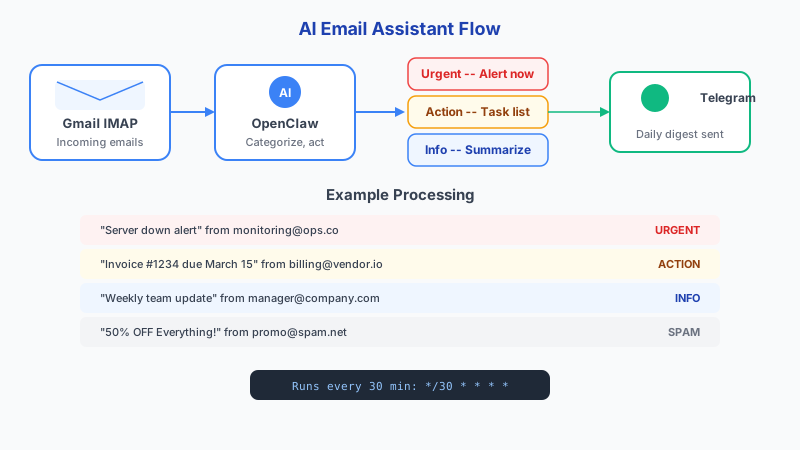
This openclaw email assistant gmail setup guide shows how to process inbox load faster using automated triage, smart drafts, and strict control over sensitive messages.
1. Generate a Gmail App Password
Gmail blocks normal password login for third-party apps. You need an App Password, which is a 16-character code that grants IMAP access without exposing your real password. This requires 2-Factor Authentication to be enabled on your Google account.
Follow these exact steps:
- Go to myaccount.google.com → Security
- Confirm 2-Step Verification is ON (required for App Passwords)
- Search for "App Passwords" in the Security page, or go to myaccount.google.com/apppasswords
- Select app: "Mail", select device: "Other (Custom name)", enter "OpenClaw"
- Click Generate — copy the 16-character password (e.g., abcd efgh ijkl mnop)
- Store this password securely — you cannot view it again after closing the dialog
Gmail IMAP Connection Settings:
┌────────────────────┬──────────────────────────────────┐
│ Setting            │ Value                            │
├────────────────────┼──────────────────────────────────┤
│ IMAP Server        │ imap.gmail.com                   │
│ Port               │ 993                              │
│ Encryption         │ SSL/TLS                          │
│ Username           │ [email protected]             │
│ Password           │ 16-char App Password             │
├────────────────────┼──────────────────────────────────┤
│ SMTP Server        │ smtp.gmail.com                   │
│ SMTP Port          │ 587 (STARTTLS) or 465 (SSL)     │
│ SMTP Username      │ [email protected]             │
│ SMTP Password      │ same App Password                │
└────────────────────┴──────────────────────────────────┘

Also enable IMAP in Gmail:
Settings → See all settings → Forwarding and POP/IMAP
→ Enable IMAP → Save Changes
2. The Email Triage Skill
The highest-value email automation is triage: categorizing incoming emails so you only spend time on what matters. Here is the complete skill file with a prompt that produces consistent, actionable output.
# ~/.openclaw/skills/email-triage.md

## Trigger
/triage

## Description
Categorize an email and extract action items.

## Instructions
The user will paste an email (subject + body) after /triage.
Analyze the email and respond with EXACTLY this format:

**Category:** [one of: 🔴 urgent-reply, 🟡 action-needed, 🔵 info-only, ⚫ spam]
**From:** [sender name and address]
**Subject:** [email subject]
**Summary:** [1 sentence summary of content]
**Deadline:** [extracted deadline, or "none mentioned"]
**Required Action:** [1 sentence describing what you need to do, or "none"]
**Draft Reply:** [2-3 sentence reply if category is urgent-reply or action-needed]

## Classification Rules
- 🔴 urgent-reply: Needs response within 4 hours. Direct question from a client,
  boss, or partner. Time-sensitive request.
- 🟡 action-needed: Has a task or deadline but not time-critical. Meeting invites,
  document reviews, approval requests.
- 🔵 info-only: FYI emails, newsletters with useful content, status updates.
  No response needed.
- ⚫ spam: Marketing, promotional, cold outreach, unsubscribe candidates.

## Rules
- Default to 🔵 info-only if the category is ambiguous
- Never classify personal emails as spam
- Flag any email mentioning money, contracts, or legal terms as 🟡 minimum
- Keep draft replies professional and concise
Get your own AI agent today
Persistent memory, channel integrations, unlimited usage. DoneClaw deploys and manages your OpenClaw instance so you just chat.
Get Started3. Example: Triage in Action
Here is a real example of what the triage skill produces when you forward an email to your agent.
# Input (pasted to Telegram):
/triage
From: Sarah Chen <[email protected]>
Subject: Q2 Project Proposal - Need Your Feedback by Thursday

Hi,

I've attached the updated Q2 project proposal with the revised timeline
and budget. Could you review sections 3 and 4 (technical requirements
and resource allocation) and send your feedback by end of day Thursday?

The steering committee meets Friday morning and we need to finalize
the document before then.

Thanks,
Sarah

# Output from agent:
**Category:** 🟡 action-needed
**From:** Sarah Chen <[email protected]>
**Subject:** Q2 Project Proposal - Need Your Feedback by Thursday
**Summary:** Sarah needs feedback on sections 3-4 of the Q2 project proposal
before the Friday steering committee meeting.
**Deadline:** Thursday end of day
**Required Action:** Review sections 3 and 4 (technical requirements and
resource allocation) of the attached Q2 proposal.
**Draft Reply:** Hi Sarah, thanks for sending this over. I'll review sections
3 and 4 today and have my feedback to you by Thursday afternoon. Let me know
if any specific concerns need priority attention.
4. Daily Email Summary Skill
Beyond individual triage, set up a daily summary that runs at 8am and reports on your unread count, categorized breakdown, and anything urgent from overnight.
# ~/.openclaw/skills/email-summary.md

## Trigger
/email-summary

## Description
Generate a daily email inbox summary.

## Instructions
Check the user's recent email context from memory.
Produce a summary with:

## Inbox Summary — [Date]
📬 **Unread:** [count]
🔴 **Urgent:** [count] — [1-line summary of each]
🟡 **Action Needed:** [count] — [nearest deadline noted]
🔵 **Info Only:** [count]
⚫ **Spam/Skip:** [count]

**Nearest Deadline:** [item] by [date/time]
**Suggested First Action:** [what to handle first and why]

## Rules
- If no emails are available in memory, tell the user to forward
  some emails first using /triage
- Prioritize by deadline proximity, not by sender importance
- Keep the summary under 150 words
# Schedule daily email summary at 8am
crontab -e
0 8 * * * docker exec openclaw-agent node /app/openclaw.mjs run-skill email-summary5. Privacy and Safety Controls
Email contains some of the most sensitive data you handle. Apply these specific controls before processing any email through OpenClaw.
- Use a local model (Ollama) for emails containing financial, legal, or medical content — nothing leaves your server
- Never auto-send replies. Always use draft-only mode and review before sending
- Create Gmail filters that skip automation for folders like "Legal", "Finance", "HR"
- Store email summaries in memory but NOT full email bodies — summaries are cheaper and more private
- Rotate your App Password every 90 days (revoke old one in Google account settings)
- If you stop using the email skill, revoke the App Password immediately
Privacy data flow for email triage:

Your Gmail → IMAP fetch (on your server) → OpenClaw agent
                                                ↓
                                    If external model (OpenRouter):
                                    Email content sent to model API
                                    ⚠️ Provider can see email text
                                                ↓
                                    If local model (Ollama):
                                    Email stays on your server
                                    ✅ Nothing leaves your machine

Recommendation: Use Ollama for email triage to keep
all email content private. The triage task does not
require a premium model — Llama 3.1 8B handles
classification and extraction well.
Conclusion
A working email assistant requires three things: a Gmail App Password for IMAP access (5 minutes to set up), a triage skill with specific classification rules (copy the skill file above), and a daily summary on a cron schedule. Start with triage-only in draft mode. Never auto-send replies until you have reviewed at least 100 triage results and confirmed accuracy. For maximum privacy, route email processing through a local Ollama model.
Skip the setup? DoneClaw deploys OpenClaw for you — $29/mo with 7-day free trial, zero configuration.
Get your own AI agent today
Persistent memory, channel integrations, unlimited usage. DoneClaw deploys and manages your OpenClaw instance so you just chat.
Get StartedFrequently asked questions
Can OpenClaw access Gmail without an App Password?
OAuth is the alternative, but it requires setting up a Google Cloud project with OAuth consent screen, which is more complex. App Passwords are the simplest path for personal Gmail accounts with 2FA enabled.
Will this work with Outlook or other email providers?
Yes. Any email provider that supports IMAP works with the same pattern. Outlook IMAP settings: server outlook.office365.com, port 993, SSL. Yahoo: imap.mail.yahoo.com, port 993, SSL. The triage skill is provider-agnostic.
How accurate is the triage categorization?
With the structured prompt above, classification accuracy is typically 85-90% on the first try. The most common error is marking action-needed emails as info-only. Review miscategorized emails and add examples to the skill instructions to improve accuracy over time.