Use Cases & Practical
OpenClaw Cron Jobs & Heartbeats Explained (With Examples)
8 min read · Updated 2026-02-27
By DoneClaw Team · We run managed OpenClaw deployments and write from hands-on production experience.
This openclaw cron jobs heartbeat guide helps you run reliable scheduled automations with clear health signals and faster incident response.
1. Cron Jobs in OpenClaw
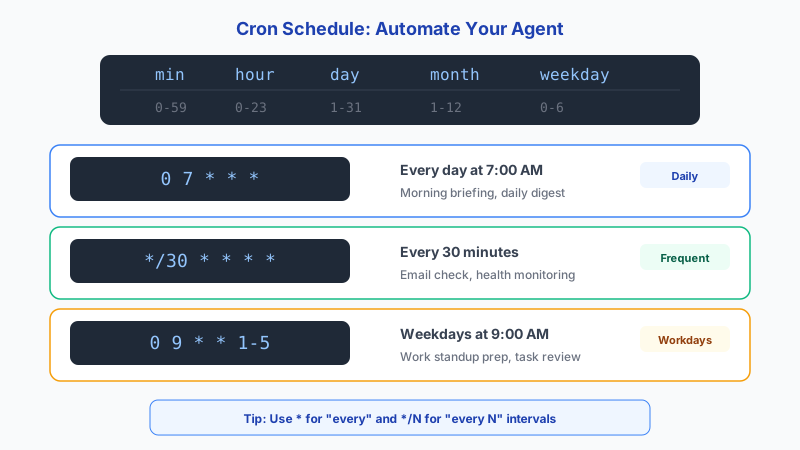
Cron jobs trigger recurring tasks: daily summaries, periodic syncs, and scheduled cleanup routines. Keep schedules explicit and timezone-aware to avoid confusion. Crontab uses five time fields: minute (0-59), hour (0-23), day of month (1-31), month (1-12), and day of week (0-7, where both 0 and 7 mean Sunday). Special syntax includes */5 for every five minutes, 1,15 for the 1st and 15th, and 1-5 for a range.
Name jobs by purpose and criticality so failures are easy to triage. Watch for common crontab pitfalls: the PATH is minimal in cron (usually just /usr/bin:/bin), so use absolute paths for all commands. The timezone is read once when the cron daemon starts — if you change /etc/timezone, you must restart crond for it to take effect. And be careful with crontab -r, which removes ALL your crontabs with no confirmation (versus -e to edit).
Get your own AI agent today
Persistent memory, channel integrations, unlimited usage. DoneClaw deploys and manages your OpenClaw instance so you just chat.
Get Started2. What Heartbeats Actually Do
Heartbeats are liveness signals proving that scheduled workflows are still running. Missing heartbeats should trigger alerts before users notice failures.
Use heartbeat checks for both job success and expected execution frequency.
- Send heartbeat at job start and completion
- Track duration and failure reason
- Set alert thresholds by criticality
- Escalate repeated failures automatically
# Edit crontab
crontab -e

# Daily standup summary at 9am
0 9 * * * docker exec openclaw-agent node /app/openclaw.mjs run-skill daily-standup

# Healthcheck every 5 minutes
*/5 * * * * curl -sf http://localhost:18789/health || docker restart openclaw-agent

# Weekly backup of OpenClaw data
0 2 * * 0 docker run --rm -v openclaw-data:/data -v ~/backups:/backup alpine tar czf /backup/openclaw-$(date +\%Y\%m\%d).tar.gz /data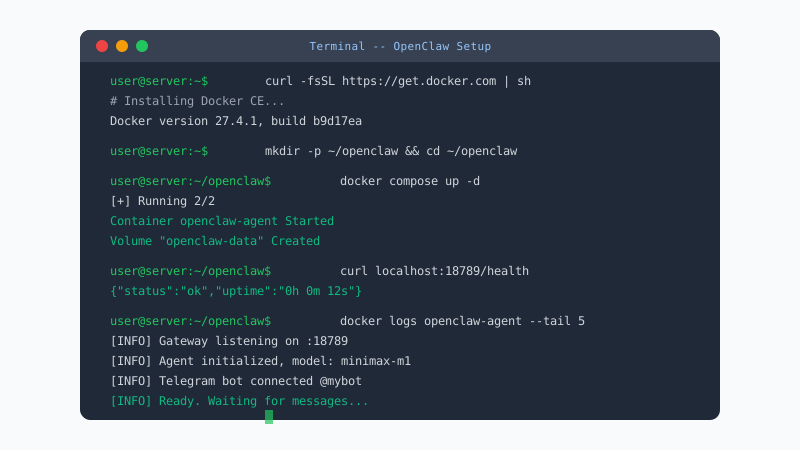
3. Reliable Scheduling Patterns
Use idempotent job logic so retries do not create duplicate actions. Keep retry limits bounded and log enough context for debugging. For monitoring missed runs, services like Healthchecks.io (20 checks free), Cronitor (5 monitors free), and Better Stack (10 monitors free) all work by expecting periodic pings and alerting when a ping is missed.
A small amount of scheduling discipline prevents major operational pain later. Consider systemd timers as an alternative to cron — timers support Persistent=true which catches up on missed runs after downtime, have built-in journalctl logging for easier debugging, but are less portable than cron across different Unix systems.
Conclusion
Reliable scheduling is about predictability: explicit cron entries, observable heartbeats that alert on missed runs, and idempotent job logic so retries never create duplicates. Set these up early and your automations will run unattended.
Skip the setup? DoneClaw deploys OpenClaw for you — $29/mo with 7-day free trial, zero configuration.
Get your own AI agent today
Persistent memory, channel integrations, unlimited usage. DoneClaw deploys and manages your OpenClaw instance so you just chat.
Get StartedFrequently asked questions
How often should heartbeat checks run?
Match heartbeat cadence to job criticality. High-priority jobs need tighter detection windows than low-impact background tasks.
Should failed jobs retry automatically?
Yes, with bounded retries and idempotent logic. Unlimited retries can hide systemic failures and increase cost.