Setup & Deployment
OpenClaw on a $5/Month VPS: Complete Deployment Guide
10 min read · Updated 2026-02-18
By DoneClaw Team · We run managed OpenClaw deployments and write from hands-on production experience.
If you want reliable automation without paying for premium cloud plans, this openclaw cheap vps hosting guide covers setup, hardening, and daily operations on a $5 server.
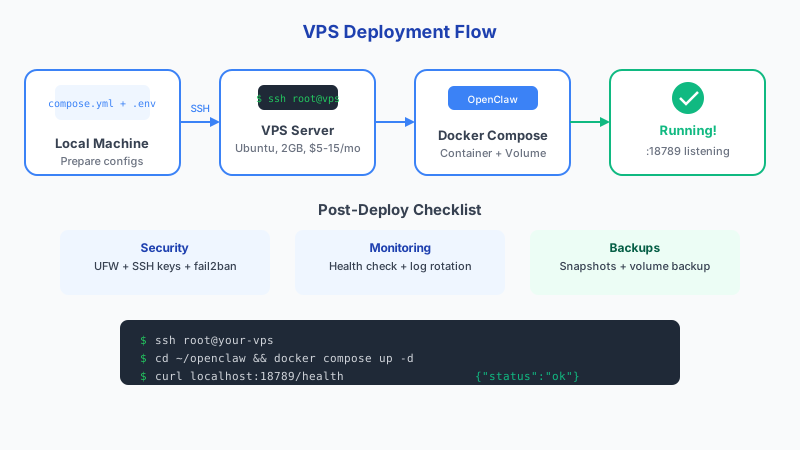
1. Pick the Right Budget VPS
Choose a provider with SSD storage, stable network throughput, and snapshot backups. CPU benchmark numbers matter less than consistency for OpenClaw task handling.
A practical baseline is 1 vCPU, 2GB RAM, and 25GB SSD. If you run heavy tools, scale to 4GB RAM early to avoid swap-related slowdowns.
Here is how the major budget providers compare: Vultr starts at $2.50/mo for 1 vCPU, 0.5GB RAM, 10GB storage, and 0.5TB bandwidth. Contabo offers the best raw specs at $4.95/mo with 4 vCPU, 8GB RAM, 50GB storage, and unlimited bandwidth. Hetzner comes in at roughly $3.79/mo (EUR) for 2 vCPU, 4GB RAM, 40GB storage, and 20TB bandwidth. DigitalOcean starts at $4/mo for 1 vCPU, 0.5GB RAM, 10GB storage, and 0.5TB bandwidth. Linode offers $5/mo for 1 vCPU, 1GB RAM, 25GB storage, and 1TB bandwidth.
Docker container startup time is 554-568ms warm start regardless of image size, so cold start optimization matters less than steady-state performance. NVMe storage delivers 300-600% better IOPS than standard SSD but costs 15-30% more. For the OS, Debian has a lower memory footprint and stable rolling updates, while Ubuntu has better community documentation and package availability.
- Linux image: Ubuntu LTS or Debian stable
- Minimum 2GB RAM for smoother Docker operation
- Region close to your messaging users for lower latency
- Snapshot/backup support before major upgrades
# SSH into your new VPS
ssh root@your-server-ip

# Create admin user
adduser deploy
usermod -aG sudo deploy
Skip 60 minutes of setup — deploy in 60 seconds
DoneClaw handles Docker, servers, security, and updates. Your OpenClaw agent is ready to chat in under a minute.
Deploy Now2. Deploy OpenClaw with Docker
Provision the VPS, create a non-root admin user, and install Docker plus Compose. Keep your OpenClaw stack in a dedicated directory with strict file permissions for `.env`.
After initial deployment, test one end-to-end flow: send a message, verify model response, and confirm data persists after container restart.
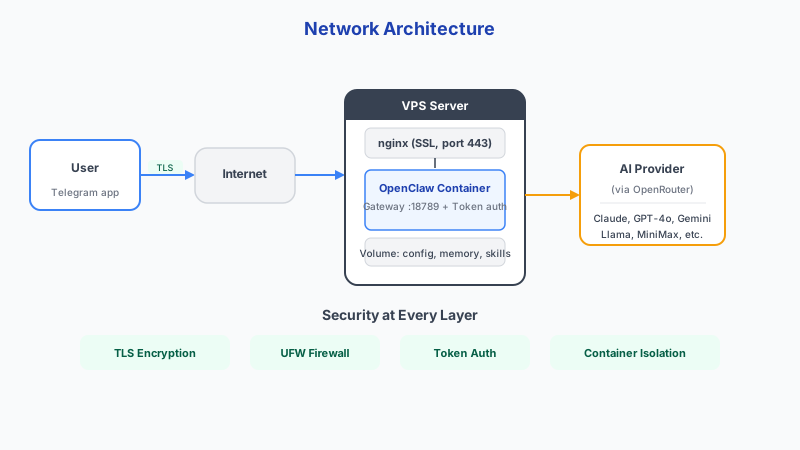
- Configure firewall before exposing any service
- Use strong secrets for API keys and channel tokens
- Run OpenClaw containers with restart policies enabled
- Validate outbound API connectivity and DNS resolution
# Install Docker
curl -fsSL https://get.docker.com | sh
sudo usermod -aG docker deploy

# Set up firewall
sudo ufw allow 22/tcp
sudo ufw allow 443/tcp
sudo ufw enable

# Create OpenClaw directory
mkdir -p /opt/openclaw && cd /opt/openclaw

# Create environment file (chmod 600 for security)
cat << 'EOF' > .env
OPENROUTER_API_KEY=sk-or-v1-your-key-here
OPENCLAW_GATEWAY_TOKEN=your-secure-token
EOF
chmod 600 .env

# Start OpenClaw
docker compose up -d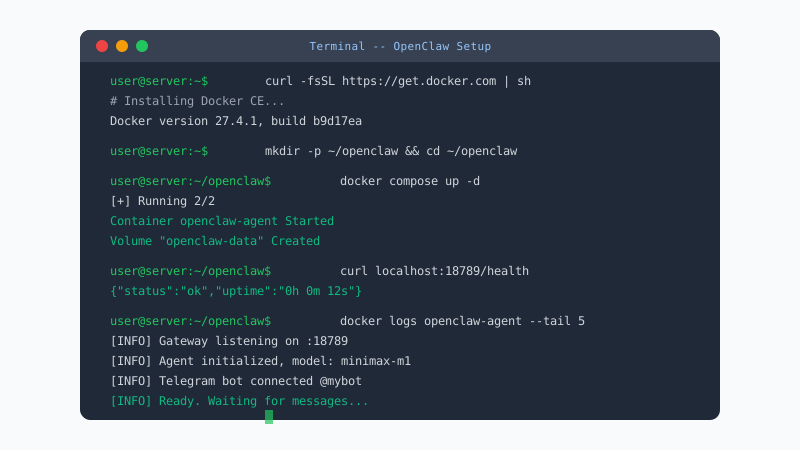
3. Keep the $5 Stack Stable
Most low-cost outages come from disk exhaustion or memory spikes. Add simple alerts for free disk space, RAM usage, and container health checks.
Set a monthly maintenance routine: apply security patches, rotate logs, test backups, and review failed jobs. This is enough for small production use.
- Enable unattended security updates
- Cap log growth and compress old logs
- Run weekly backup restore checks, not only backups
- Track response latency to catch degradation early
Conclusion
Running OpenClaw on a budget VPS works well when you pair lean infrastructure with disciplined operations. A $5 server is fine for production; unmanaged security and monitoring are not.
Skip the setup? DoneClaw deploys OpenClaw for you — $29/mo with 7-day free trial, zero configuration.
Skip 60 minutes of setup — deploy in 60 seconds
DoneClaw handles Docker, servers, security, and updates. Your OpenClaw agent is ready to chat in under a minute.
Deploy NowFrequently asked questions
Can I run OpenClaw on 1GB RAM?
You can for tests, but production reliability is usually poor. Start at 2GB RAM minimum for practical daily use.
Should I expose OpenClaw directly to the internet?
Avoid direct exposure where possible. Use a reverse proxy, access controls, and preferably a private network layer like Tailscale.