Use Cases & Practical
10 Things I Automated With OpenClaw This Month
9 min read · Updated 2026-02-26
By DoneClaw Team · We run managed OpenClaw deployments and write from hands-on production experience.
These openclaw automation examples use cases come from practical, repeatable workflows that save time each week without creating high maintenance overhead.
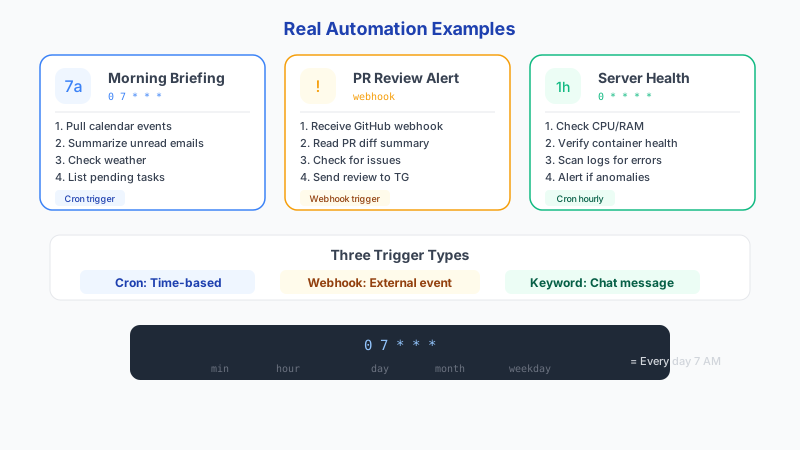
1. Morning Briefing (Cron, ~15 min/week saved)
Every morning at 7am, a cron job triggers the /briefing skill. It pulls recent messages from memory, lists any stored calendar events, and sends a summary to Telegram. Before this, I spent 15 minutes each morning manually checking messages and planning my day.
# Cron entry:
0 7 * * * docker exec openclaw-agent node /app/openclaw.mjs run-skill daily-briefing

# Example output sent to Telegram:
# 📅 Monday, Feb 24
# 🔔 3 messages overnight:
#   - Client asked about deployment timeline
#   - Server alert: disk at 85%
#   - Team standup moved to 10am
# ⚡ Priorities:
#   1. Reply to client re: deployment
#   2. Clean up server disk space
#   3. Prep standup notes
2. Expense Categorization (Message trigger, ~20 min/week saved)
When I buy something, I send a quick message like "/expense $14.50 lunch with client" and the agent logs it with a category, running total, and monthly breakdown. No spreadsheet, no app. At month end I send /expenses-summary and get a categorized report.
# Input:
/expense $14.50 lunch with client

# Output:
✅ Logged: $14.50 — food — lunch with client — Feb 24
📊 February total: $342.80 (food: $89.50, software: $127.30, transport: $126.00)
3. PR Review Summary (Webhook, ~30 min/week saved)
A GitHub webhook triggers the agent whenever a PR is opened on my repos. The agent reads the diff summary, identifies potential issues, and sends a 3-line summary to my Telegram. I review the summary and decide whether to look at the PR now or later, instead of context-switching to GitHub for every notification.
# Example notification received on Telegram:
🔀 PR #47: "Add rate limiting to proxy endpoint"
📝 Changes: 3 files, +87 -12 lines
⚠️ Note: New dependency added (express-rate-limit)
📋 Verdict: Looks clean, review when convenient
4. Slack-Style Standup (Cron, ~25 min/week saved)
At 9:50am every weekday (10 minutes before standup), the agent compiles what I worked on yesterday from conversation history and memory, what I plan to do today based on open tasks, and any blockers. It sends the standup message to Telegram so I can copy-paste it or just read it aloud.
# Cron entry:
50 9 * * 1-5 docker exec openclaw-agent node /app/openclaw.mjs run-skill standup

# Example output:
# 🧍 Standup — Tuesday Feb 25
# ✅ Yesterday:
#   - Deployed rate limiting to proxy (PR #47)
#   - Fixed container restart issue for user 8a27bb
#   - Reviewed 3 support emails
# 📋 Today:
#   - Finish billing webhook integration
#   - Write tests for new proxy middleware
# 🚧 Blockers:
#   - Waiting on Stripe test mode credentials
5. Meeting Notes (Message trigger, ~45 min/week saved)
After any meeting, I paste the raw notes or transcript into Telegram with /meeting. The agent produces a structured summary: key decisions, action items with owners and deadlines, and open questions. This used to take me 15 minutes per meeting to do manually. Now it takes 10 seconds to paste and I get better output.
Get your own AI agent today
Persistent memory, channel integrations, unlimited usage. DoneClaw deploys and manages your OpenClaw instance so you just chat.
Get Started6. Weekly Report (Cron, ~1 hour/week saved)
Every Friday at 4pm, the agent compiles a weekly summary from all conversations, completed tasks, logged expenses, and any stored metrics. It formats the report and sends it to Telegram. I used to spend an hour every Friday afternoon pulling data from multiple sources and writing this manually.
# Cron entry:
0 16 * * 5 docker exec openclaw-agent node /app/openclaw.mjs run-skill weekly-report

# The skill instructions tell the agent to:
# 1. Recall all tasks marked complete this week
# 2. Summarize key conversations and decisions
# 3. Pull expense totals from memory
# 4. List open items carrying into next week
# 5. Format as a concise report (under 300 words)
7. Server Health Check (Cron, prevents downtime)
Every 5 minutes, a health check pings my services and alerts me on Telegram if anything is down. It checks HTTP status codes and response times. If a service is slow (over 2 seconds) or returning errors, I get a message immediately instead of discovering it hours later from a user complaint.
# Cron entry:
*/5 * * * * curl -sf http://localhost:18789/health > /dev/null || \
  docker exec openclaw-agent node /app/openclaw.mjs run-skill deploy-checker

# Alert example:
# ❌ ALERT — Feb 25 14:35
# api.doneclaw.com — 503 Service Unavailable
# Response time: timeout after 10s
# Last healthy: 14:30
# Action: Container restart triggered automatically
8. News Digest (Cron, ~20 min/week saved)
At 8am daily, the agent searches for news on topics I care about (AI, startup funding, developer tools) and sends a 5-item digest to Telegram. Each item gets a 1-sentence summary. I stopped spending 20 minutes scrolling tech news sites because the digest covers what matters.
9. Calendar Prep (Cron, ~15 min/week saved)
At 8pm the night before, the agent reviews tomorrow's stored calendar events and prepares context notes for each meeting. If I had a conversation with the person last week, it pulls relevant memory. If there are related tasks, it lists them. I walk into every meeting with context instead of scrambling.
10. Email Follow-Up Reminders (Message trigger, ~20 min/week saved)
When I triage an email that needs follow-up, I send "/followup 3 days client proposal" and the agent stores a reminder. Three days later, it sends me a Telegram message: "Follow up: client proposal — sent Feb 22, no reply yet." Before this, follow-ups lived in my head or got forgotten.
# Input:
/followup 3 days client proposal for Q2 project

# 3 days later, received on Telegram:
⏰ Follow-up reminder:
📧 "client proposal for Q2 project"
📅 Originally sent: Feb 22
⚠️ Status: No reply detected
💡 Suggested action: Send a polite check-in
Conclusion
These 10 automations save roughly 4 hours per week combined. The highest-value ones are the morning briefing, weekly report, and meeting summarizer — each replaces a manual process that was tedious and error-prone. Start with one, measure the time saved, and add more when the first one is stable.
Skip the setup? DoneClaw deploys OpenClaw for you — $29/mo with 7-day free trial, zero configuration.
Get your own AI agent today
Persistent memory, channel integrations, unlimited usage. DoneClaw deploys and manages your OpenClaw instance so you just chat.
Get StartedFrequently asked questions
Which automation should I build first?
The morning briefing. It takes 5 minutes to set up (one cron entry and one skill file), runs every day, and delivers value immediately. It also teaches you the skill-plus-cron pattern you will use for everything else.
Do all of these need cron jobs?
No. Five use cron (briefing, standup, weekly report, health check, news digest). Three use message triggers (expenses, meeting notes, follow-ups). Two use webhooks or scheduled triggers (PR review, calendar prep). Mix and match based on whether the automation is time-based or event-based.
How much does running all 10 cost in API fees?
With Gemini Flash as the default model, all 10 automations together use roughly 2-5 million tokens per month. At $0.10/M input and $0.40/M output, that is $1-3/month in API costs. The health check is the highest-volume automation but uses the fewest tokens per check.