Use Cases & Practical
What Is an OpenClaw Agent? How Persistent AI Agents Work
8 min read · Updated 2026-03-01
By DoneClaw Team · We run managed OpenClaw deployments and write from hands-on production experience.
If you have heard the term "OpenClaw agent" but are not sure what it means or how it differs from a regular chatbot, this article explains the concept from the ground up. An OpenClaw agent is a persistent, always-on AI system that lives in its own container, remembers past conversations, uses tools, and connects to your messaging channels.
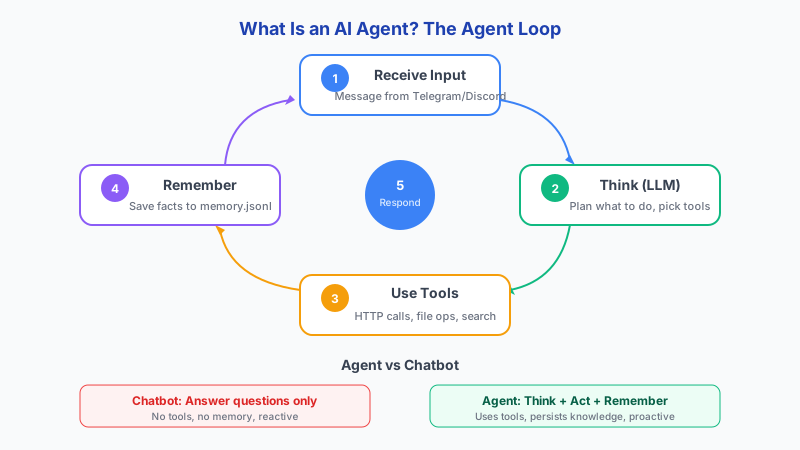
1. Agents vs Chatbots: The Core Difference
A chatbot responds to messages in a session. When the session ends, the context is gone. You start fresh every time you open the chat window, and the bot has no memory of what you discussed yesterday or what tasks it completed last week. Most consumer AI products work this way because it is simpler to build and cheaper to run.
An OpenClaw agent is fundamentally different. It runs continuously in a Docker container with persistent storage. It remembers previous conversations, maintains context across days and weeks, and can take actions on your behalf even when you are not actively chatting with it. Think of it less like a chat window and more like a personal assistant that is always available and always up to date on your projects. The key differences: agents are autonomous (they execute multi-step plans), while chatbots are human-triggered (they respond to prompts). Agents have persistent memory across sessions, while chatbots have session-only context. Agents use tools like code execution, APIs, and file I/O, while chatbots produce text only.
This persistence changes what is possible. Instead of re-explaining your project every time you start a conversation, you can say "check in on the task we discussed yesterday" and the agent knows exactly what you mean. It can track ongoing work, follow up on deadlines, and maintain a running understanding of your priorities. The agent framework landscape includes OpenClaw (220K+ GitHub stars, focused on personal AI), CrewAI (multi-agent orchestration), LangGraph (lowest latency, graph-based workflows), and AutoGPT (which pioneered the space but is largely obsolete). The AI agent market is projected at $7.8 billion in 2025, growing to $52 billion by 2030, and Gartner predicts 40% of enterprise applications will include agentic AI by 2026.
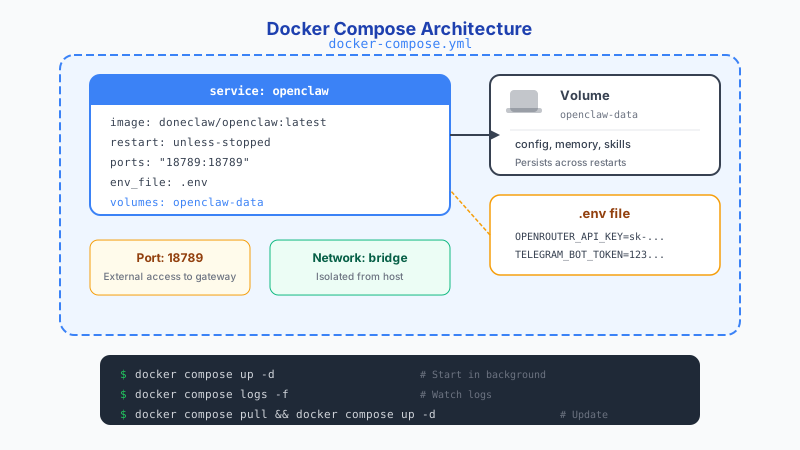
2. How the Architecture Works
Each OpenClaw agent runs inside its own Docker container with a dedicated volume for storing configuration, memory, and skills. The container includes the OpenClaw runtime, which handles message routing, model selection, memory retrieval, and tool execution. When a message arrives from Telegram, Discord, or another channel, the runtime processes it, retrieves relevant memory, sends it to the configured AI model, and returns the response.
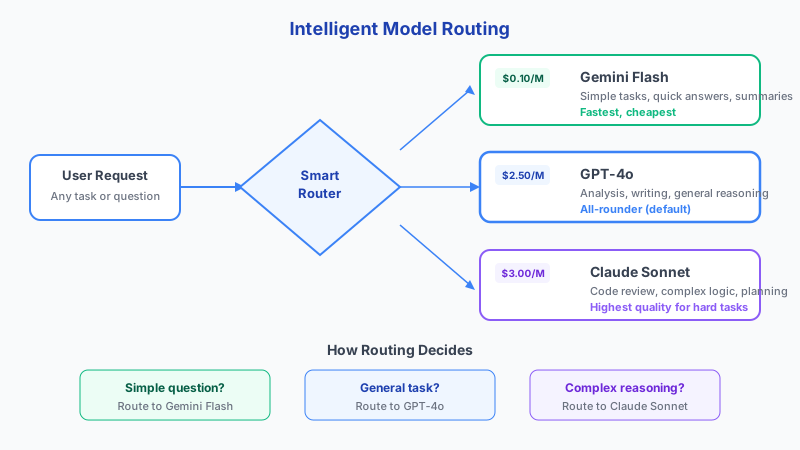
The model layer is flexible. OpenClaw supports routing requests to different AI providers through services like OpenRouter, so you can use Claude, GPT, Llama, or other models depending on the task. The agent configuration specifies which model to use by default and can route specific types of requests to different models for cost or quality optimization.
Memory is stored locally in the container volume and retrieved contextually on each request. The agent selects relevant memories based on the current conversation and injects them into the prompt, giving the model access to historical context without sending your entire history on every message. This keeps costs manageable while preserving continuity.
- Each agent runs in an isolated Docker container
- Persistent volume stores memory, config, and skills
- Model routing supports multiple AI providers
- Memory retrieval adds relevant context to each request
Get your own AI agent today
Persistent memory, channel integrations, unlimited usage. DoneClaw deploys and manages your OpenClaw instance so you just chat.
Get Started3. Channel Integrations
OpenClaw agents connect to messaging platforms through channel integrations. Telegram is the most commonly used channel, but Discord and WhatsApp are also supported. You interact with your agent through your normal messaging app, and the agent responds in the same thread. There is no special interface to learn.
Channel integrations are configured in the agent settings. You provide the bot token or API credentials for your chosen platform, and OpenClaw handles the webhook registration, message parsing, and response formatting. You can connect multiple channels to the same agent, so the same persistent memory and context is available regardless of how you reach your agent.
4. Tools and Skills
Beyond conversation, OpenClaw agents can use tools and run skills. Tools are capabilities like web search, file operations, or API calls that the agent can invoke during a conversation. Skills are reusable workflows that package multiple steps into a single command, like generating a daily summary or checking a list of websites for changes. Under the hood, agents use planning strategies to break down complex requests: Chain of Thought (step-by-step reasoning), ReAct (interleaved reasoning and action), and Tree of Thought (evaluating multiple solution paths before committing to one).
The combination of persistent memory, tool access, and scheduled execution is what makes an agent meaningfully different from a chatbot. Your OpenClaw agent can check your calendar every morning, summarize new emails, monitor a website for price drops, or run a weekly report without any manual triggering. Multi-agent research papers grew from 820 to over 2,500 between 2024 and 2025, reflecting the rapid evolution of this space.
Skills can be created by the community and shared through ClawHub, or you can write your own. The skill system is designed to be simple enough that non-developers can use existing skills while developers can create custom ones for specific workflows.
Conclusion
An OpenClaw agent is a persistent AI system that runs in its own container, remembers your conversations, connects to your messaging channels, and takes action on your behalf. It is not a chatbot you visit; it is an assistant that is always running and always aware of your context.
Skip the setup? DoneClaw deploys OpenClaw for you — $29/mo with 7-day free trial, zero configuration.
Get your own AI agent today
Persistent memory, channel integrations, unlimited usage. DoneClaw deploys and manages your OpenClaw instance so you just chat.
Get StartedFrequently asked questions
Does an OpenClaw agent run all the time?
Yes. The agent runs in a Docker container that stays active continuously. It can receive messages and execute scheduled tasks at any time, not just when you are actively chatting with it.
How much memory can an agent store?
Memory is stored in the container volume, so the limit is determined by your storage allocation. In practice, text-based memories are very small, and most agents can store years of conversation history without any issues.
Can I use multiple AI models with one agent?
Yes. OpenClaw supports model routing, which lets you assign different models to different types of tasks. You might use a fast, cheap model for simple questions and a more capable model for complex reasoning.
Do I need to code to use an OpenClaw agent?
Basic usage requires no coding. You configure the agent through settings files or a dashboard and interact with it through messaging apps. Creating custom skills involves some scripting, but pre-built skills can be installed without writing code.
What happens if the container crashes?
Docker restart policies automatically restart the container if it stops unexpectedly. Your memory and configuration are stored in a persistent volume, so nothing is lost during a restart.