Security & Privacy
Is OpenClaw Safe? Honest Privacy & Security Assessment
8 min read · Updated 2026-02-25
By DoneClaw Team · We run managed OpenClaw deployments and write from hands-on production experience.
The right answer to “is openclaw safe privacy risks” is conditional: OpenClaw can be very safe, but only if deployment, permissions, and operations are configured correctly.
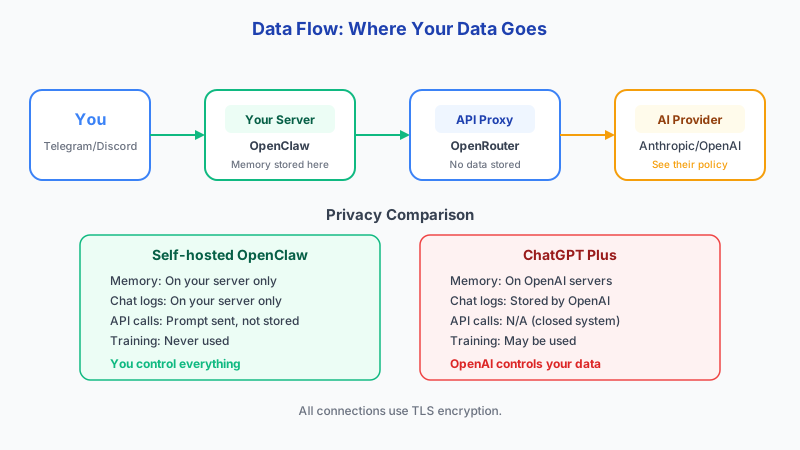
1. How Data Flows Through OpenClaw
Before assessing safety, understand what data goes where. Here is the complete data flow for a typical OpenClaw deployment:
Data Flow (self-hosted with Telegram + OpenRouter):

You (phone) → Telegram servers → OpenClaw container → OpenRouter API → AI model provider
                                       ↕
                               Docker volume (memory,
                               config, conversation
                               history stored locally)

What leaves your server:
1. Your prompt text → sent to OpenRouter → forwarded to model provider (e.g., Anthropic, Google)
2. Model response → returned through OpenRouter → back to your container
3. Telegram messages → routed through Telegram servers (encrypted in transit)

What stays on your server:
1. Conversation history (Docker volume)
2. Memory files (Docker volume)
3. Skill definitions (Docker volume)
4. API keys and tokens (.env file)
5. Container logs
2. Five Attack Vectors and How to Mitigate Each
Here are the five realistic threats to an OpenClaw deployment, ordered by likelihood, with specific mitigations for each.
- Mitigation: Configure UFW to block port 18789 from public access
- Mitigation: Use a reverse proxy (nginx) with authentication
- Mitigation: Bind OpenClaw to 127.0.0.1 only, access via Tailscale
- Mitigation: Set gateway.auth token and validate on every request
Attack Vector 1: Exposed Port (MOST COMMON)
─────────────────────────────────────────────
Risk: OpenClaw gateway port 18789 exposed to the internet.
      Anyone can send requests to your agent, read responses,
      or abuse your API credits.
Impact: HIGH — unauthorized access, API cost abuse
Likelihood: HIGH — default Docker config binds to 0.0.0.0
Pre-hardened security, zero configuration
Your OpenClaw container runs in an isolated environment with automatic security updates, encrypted storage, and network isolation.
Get Started Securely3. Attack Vectors 2-3: Secrets and Data Exfiltration
Attack Vector 2: API Key Leak. Your OpenRouter API key, Telegram bot token, and gateway token are stored in .env or openclaw.json. If these files are committed to git, shared in a screenshot, or readable by other users on the system, attackers get full access to your accounts and billing.
Attack Vector 3: Model Data Exfiltration. Every prompt you send to an external API (OpenRouter, OpenAI, etc.) is visible to the model provider. If you process sensitive data like client contracts, financial records, or medical information through a cloud model, that data leaves your server.
For compliance: GDPR requires consent that is freely given, specific, informed, and unambiguous. The right to deletion must be technically implementable, meaning you need a way to purge a user's data from Docker volumes and conversation history. The EU AI Act takes effect August 2026 with transparency requirements for AI systems. Rotate API keys every 90 days and implement a grace period where both old and new keys work during transition. Consider HashiCorp Vault for secrets management or GitGuardian for detecting leaked credentials in code.
# Mitigations for API Key Leak:

# 1. Restrict .env file permissions (owner-only read)
chmod 600 /opt/openclaw/.env

# 2. Add to .gitignore (never commit secrets)
echo ".env" >> .gitignore
echo "openclaw.json" >> .gitignore

# 3. Use environment variables instead of config files
docker run -e OPENROUTER_API_KEY=sk-or-v1-xxx \
           -e OPENCLAW_GATEWAY_TOKEN=xxx \
           doneclaw/openclaw:latest

# 4. Rotate tokens immediately if leaked
# Generate new gateway token:
openssl rand -hex 32
# Mitigations for Data Exfiltration:
# 1. Use local models (Ollama) for sensitive data — nothing leaves your machine
# Configure in openclaw.json:
# "primary": "ollama/llama3.1:8b"
# 2. Block outbound traffic from container except to known APIs
# (requires iptables/nftables rules on the host)
sudo iptables -A OUTPUT -m owner --uid-owner 1000 -d api.openrouter.ai -j ACCEPT
sudo iptables -A OUTPUT -m owner --uid-owner 1000 -d api.telegram.org -j ACCEPT
sudo iptables -A OUTPUT -m owner --uid-owner 1000 -j DROP4. Attack Vectors 4-5: Supply Chain and Privilege Escalation
Attack Vector 4: Supply Chain — Malicious Docker Image. If you pull an unverified OpenClaw image, it could contain backdoors. Always use the official image (doneclaw/openclaw:latest) and pin specific versions for production use.
Attack Vector 5: Privilege Escalation. If the container runs as root or has unnecessary Linux capabilities, a compromised skill or model output could escape the container and access the host system.
For data-at-rest protection, LUKS full-disk encryption for Docker volumes adds 2-5% performance overhead with AES-NI hardware acceleration, or 20-30% without hardware support. Most modern servers have AES-NI, making the overhead negligible.
Runtime security tools to consider: Falco (CNCF graduated project) provides real-time container monitoring with syscall analysis, alerting on suspicious activity like unexpected shell access or network connections. gVisor (from Google) provides a user-space kernel that sandboxes containers more strictly than standard namespaces.
# docker-compose.yml with security hardening
services:
  openclaw:
    image: doneclaw/openclaw:latest  # official image only
    container_name: openclaw-agent
    restart: unless-stopped
    security_opt:
      - no-new-privileges:true      # prevent privilege escalation
    read_only: true                  # read-only root filesystem
    tmpfs:
      - /tmp                         # writable temp directory
    volumes:
      - openclaw-data:/home/node/.openclaw  # persistent data only
    environment:
      - OPENROUTER_API_KEY=${OPENROUTER_API_KEY}
      - OPENCLAW_GATEWAY_TOKEN=${OPENCLAW_GATEWAY_TOKEN}
    deploy:
      resources:
        limits:
          memory: 512M               # prevent memory abuse
          cpus: '1.0'                # prevent CPU abuse
5. Security Checklist
Run through this checklist before considering your deployment production-ready. Each item addresses a specific attack vector from above.
- Items 1-3 prevent Attack Vector 1 (exposed port)
- Items 4-6 prevent Attack Vector 2 (API key leak)
- Items 7-8 prevent Attack Vector 3 (data exfiltration)
- Items 9-11 prevent Attack Vector 4 (supply chain)
- Items 10-11 prevent Attack Vector 5 (privilege escalation)
OpenClaw Security Checklist:
──────────────────────────────────────────────────────────────
[ ] Firewall: UFW enabled, only ports 22 and 443 open
[ ] Firewall: Port 18789 NOT accessible from public internet
[ ] Secrets: .env file has chmod 600 permissions
[ ] Secrets: .env and openclaw.json in .gitignore
[ ] Secrets: Gateway auth token is set (not empty)
[ ] Network: Reverse proxy with TLS in front of OpenClaw
[ ] Network: Access restricted to Tailscale or VPN
[ ] Container: Using official doneclaw/openclaw image
[ ] Container: no-new-privileges security option set
[ ] Container: Resource limits (memory + CPU) configured
[ ] Data: Sensitive prompts route to local model (Ollama)
[ ] Data: Backups encrypted before off-site storage
[ ] Monitoring: Container health check running
[ ] Monitoring: Log rotation configured
[ ] Access: SSH key-only auth (password auth disabled)
[ ] Access: fail2ban installed and active
Conclusion
OpenClaw is as safe as the infrastructure you run it on. The five real threats are exposed ports, leaked API keys, data sent to external models, unverified Docker images, and over-privileged containers. Each has specific, concrete mitigations. Run through the security checklist, use a firewall, and route sensitive data through local models. For zero-configuration security, managed DoneClaw handles all of this by default.
Skip the setup? DoneClaw deploys OpenClaw for you — $29/mo with 7-day free trial, zero configuration.
Pre-hardened security, zero configuration
Your OpenClaw container runs in an isolated environment with automatic security updates, encrypted storage, and network isolation.
Get Started SecurelyFrequently asked questions
Is self-hosted OpenClaw safer than ChatGPT?
It can be, but only if you configure it properly. A self-hosted instance with an exposed port and no firewall is less secure than ChatGPT. A properly hardened instance with local models gives you more privacy because data never leaves your server.
Does OpenClaw send my data to third parties?
Only if you configure it to use external model APIs (OpenRouter, OpenAI, etc.). Every prompt sent to a cloud model is visible to the provider. Use Ollama with a local model to keep all data on your server.
What happens if my API key leaks?
Revoke it immediately on the provider dashboard (OpenRouter, Telegram BotFather). Generate new keys, update your .env file, and restart the container. Check usage logs for unauthorized charges.