Setup & Deployment
How to Deploy OpenClaw: Complete Guide (Docker, VPS, Cloud)
10 min read · Updated 2026-03-01
By DoneClaw Team · We run managed OpenClaw deployments and write from hands-on production experience.
Choosing how to deploy OpenClaw depends on your technical comfort, budget, and how much time you want to spend on infrastructure. This guide walks through every major deployment method so you can pick the right one and get running without guesswork.
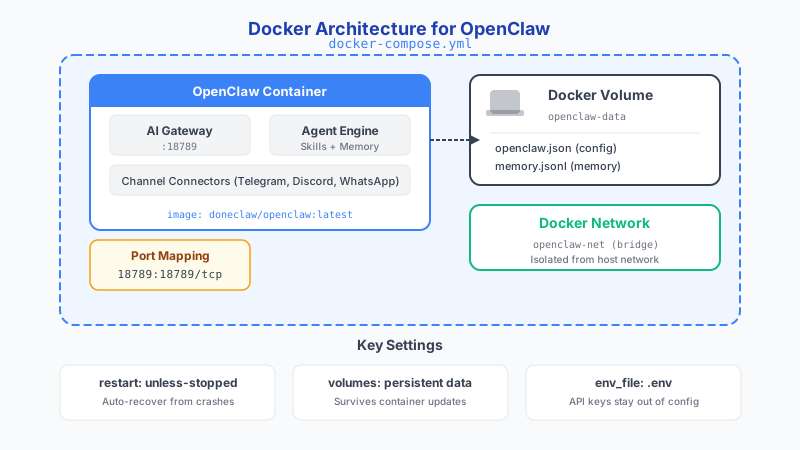
1. Deployment Methods at a Glance
There are three practical ways to deploy OpenClaw today: Docker on a local machine, Docker on a remote VPS, and managed hosting through a service like DoneClaw. Each approach has different tradeoffs in cost, control, and maintenance effort, and the best choice depends on what you actually need from your agent.
Local Docker is ideal for testing and development. You get full control and zero hosting cost, but your agent only runs while your machine is on. VPS deployment gives you a dedicated always-on server for a few dollars a month, with full root access and the ability to customize everything. Managed hosting removes the infrastructure entirely and lets you focus on using the agent rather than maintaining it.
Before picking a method, consider three questions: do you need your agent running 24/7, are you comfortable managing Linux servers, and how much time do you want to spend on updates and monitoring? Your answers will point you to the right deployment path.
2. Deploy OpenClaw with Docker Locally
Local Docker deployment is the fastest way to test OpenClaw. Install Docker Desktop on your machine, create a directory for your OpenClaw configuration, set up environment variables for your API keys, and run docker compose up. Within a few minutes you will have a working agent you can interact with through Telegram or another channel.
The main limitation of local deployment is availability. Your agent stops when your computer sleeps or shuts down. This makes it suitable for experimentation and development, but not for workflows that need to respond at any hour. You also need to handle networking yourself if you want external services like Telegram webhooks to reach your local machine. Note that Compose v2 uses docker compose (with a space) rather than the older docker-compose (with a hyphen). You can also drop the version: key from your compose files — it has been deprecated. Resource limits use the deploy.resources.limits syntax.
For developers who want to test skills, tune model routing, or experiment with memory configurations before committing to a hosted setup, local Docker is the right starting point. Once your configuration is dialed in, you can move the same Docker Compose file to a VPS with minimal changes.
- Install Docker Desktop and verify with docker --version
- Create a project directory with docker-compose.yml and .env
- Set API keys, channel tokens, and model preferences in .env
- Run docker compose up -d and test with a message to your bot
# docker-compose.yml
services:
  openclaw:
    image: doneclaw/openclaw:latest
    container_name: openclaw-agent
    restart: unless-stopped
    ports:
      - "18789:18789"
    volumes:
      - openclaw-data:/home/node/.openclaw
    environment:
      - OPENROUTER_API_KEY=${OPENROUTER_API_KEY}
      - OPENCLAW_GATEWAY_TOKEN=${OPENCLAW_GATEWAY_TOKEN}
    healthcheck:
      test: ["CMD", "curl", "-f", "http://localhost:18789/health"]
      interval: 30s
      timeout: 10s
      retries: 3

volumes:
  openclaw-data: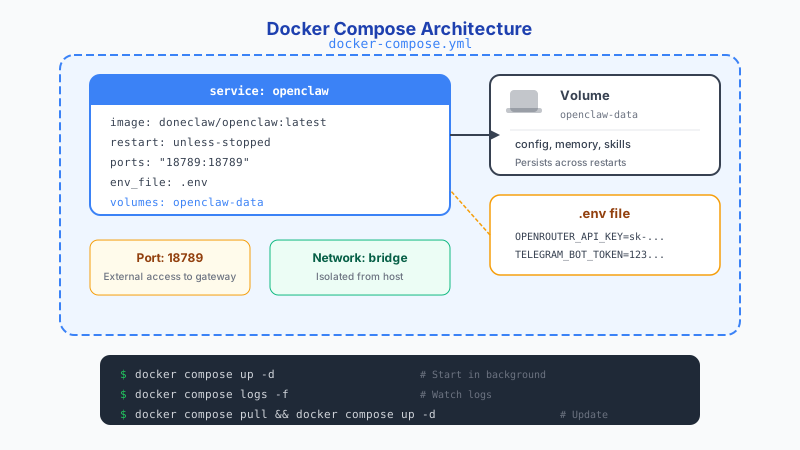
Skip 60 minutes of setup — deploy in 60 seconds
DoneClaw handles Docker, servers, security, and updates. Your OpenClaw agent is ready to chat in under a minute.
Deploy Now3. Deploy OpenClaw on a VPS
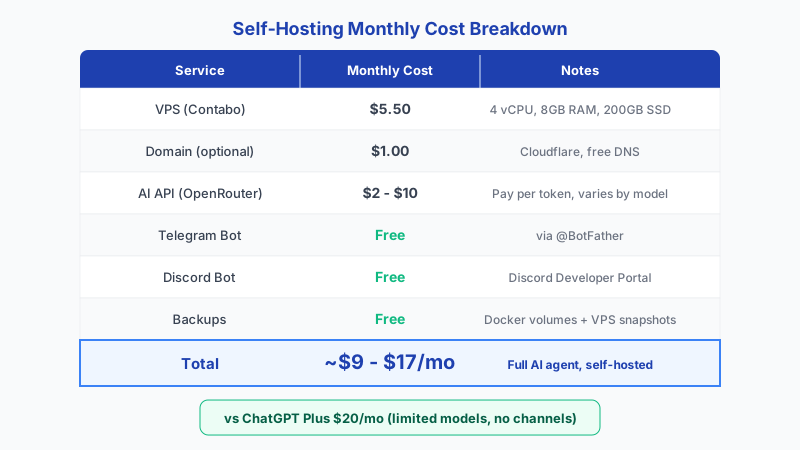
VPS deployment is the most common production setup for self-hosters. Providers like Contabo, Hetzner, and DigitalOcean offer servers starting around five dollars per month with enough resources to run OpenClaw comfortably. You get a dedicated Linux machine with a public IP address, which means your agent runs around the clock and can receive webhooks from any messaging platform.
The setup process involves provisioning a server, creating a non-root user, installing Docker, configuring a firewall, and deploying your OpenClaw stack. You should also set up a reverse proxy with TLS so that webhook traffic is encrypted. The whole process takes about thirty minutes if you have done it before, or an hour or two for a first-timer following a guide step by step. Healthcheck defaults in Docker are 30 seconds interval, 30 seconds timeout, and 3 retries before marking a container unhealthy.
The ongoing cost of VPS hosting is predictable and low, but you take on responsibility for security patches, monitoring, backups, and troubleshooting. If a container crashes at 3am, you are the one who needs to fix it. For users who enjoy server administration or need full control over their data, this tradeoff is worthwhile. One often-overlooked detail: Docker's default logging driver has no rotation, so logs can fill your disk. Set max-size and max-file in daemon.json or per-container to prevent this. Also be aware that bridge networking adds 5-10% NAT overhead compared to host networking.
- Choose a VPS with at least 2GB RAM and SSD storage
- Harden SSH access and enable a firewall before deploying
- Use a reverse proxy like nginx with a TLS certificate
- Set container restart policies and basic health monitoring
# Deploy commands
docker compose pull
docker compose up -d
docker compose logs -f --tail 100

# Verify health
curl http://localhost:18789/health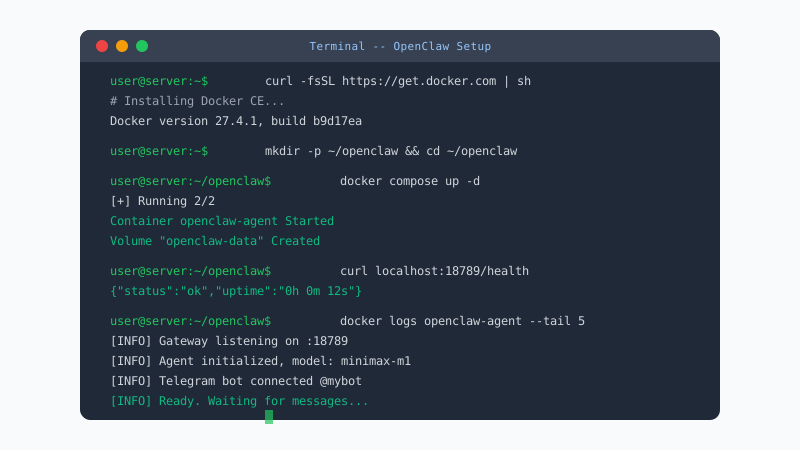
4. Managed Hosting with DoneClaw
DoneClaw provides OpenClaw as a managed service. You sign up, choose a plan, and your agent container is provisioned automatically with channel integrations, model routing, and monitoring already configured. There is no server to manage, no Docker to install, and no security patches to apply.
The managed approach costs more per month than a bare VPS, but it eliminates the operational overhead entirely. Updates are applied automatically, containers are monitored for health, and channel integrations can be set up from a dashboard without editing configuration files. For users who want a working agent without the DevOps, this is the most direct path.
DoneClaw is particularly useful for non-technical users, small teams without dedicated infrastructure staff, and anyone who values time over the marginal cost savings of self-hosting. You can always export your data and move to self-hosting later if your needs change.
5. Choosing the Right Deployment Method
If you are evaluating OpenClaw for the first time, start with local Docker to get familiar with the configuration and capabilities. If you decide to run it in production and have Linux experience, a VPS gives you the best balance of cost and control. If you want to skip infrastructure management entirely, DoneClaw handles it for you.
Many users start with one method and migrate later. The OpenClaw configuration format is the same across all deployment targets, so moving from local to VPS or from VPS to managed hosting requires minimal changes. Pick the method that matches your current priorities and adjust as your needs evolve.
Conclusion
The best way to deploy OpenClaw depends on your priorities. Local Docker is great for testing, VPS hosting gives you full control in production, and managed hosting through DoneClaw removes the operational burden. Start with what fits your skill level and timeline, and scale up from there.
Skip the setup? DoneClaw deploys OpenClaw for you — $29/mo with 7-day free trial, zero configuration.
Skip 60 minutes of setup — deploy in 60 seconds
DoneClaw handles Docker, servers, security, and updates. Your OpenClaw agent is ready to chat in under a minute.
Deploy NowFrequently asked questions
What are the minimum server requirements for OpenClaw?
OpenClaw runs well on a machine with 2GB RAM, 1 vCPU, and 20GB of SSD storage. If you plan to run local models alongside the agent, increase RAM to 8GB or more.
Can I migrate from self-hosted to managed hosting later?
Yes. OpenClaw uses the same configuration format regardless of where it runs. You can move your config and memory data to a managed service like DoneClaw without starting over.
Is Docker required for all deployment methods?
Docker is the standard deployment mechanism for OpenClaw. Even managed services like DoneClaw run your agent in a Docker container behind the scenes, but you do not need to interact with Docker directly.
How do I handle TLS certificates on a VPS?
Use Certbot with a reverse proxy like nginx to obtain free TLS certificates from Let's Encrypt. Most guides cover this as part of the initial VPS setup process.