Skills & Customization
How to Write Your First Custom OpenClaw Skill
9 min read · Updated 2026-02-23
By DoneClaw Team · We run managed OpenClaw deployments and write from hands-on production experience.
This create custom openclaw skill tutorial helps you design your first skill safely: clear scope, minimal permissions, and predictable behavior under real user prompts.
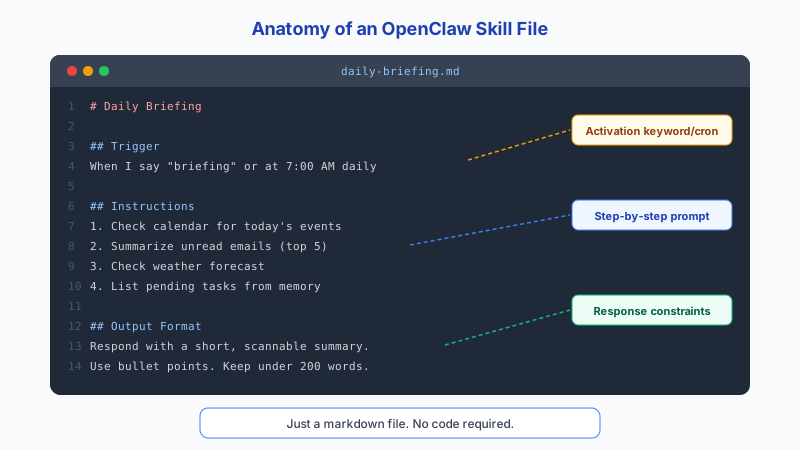
1. Define One Narrow Job
Good first skills solve one clear problem, such as summarizing daily logs or drafting follow-up emails. Narrow scope makes testing and reliability far better.
Skills are defined as SKILL.md files stored in ~/.openclaw/workspace/skills/<name>/SKILL.md. Each skill has YAML frontmatter (name, description, version) followed by a Markdown body with instructions. The slug pattern must match ^[a-z0-9][a-z0-9-]*$ and the maximum skill bundle size is 50MB.
Avoid multi-purpose “do everything” skills at the beginning.
Get your own AI agent today
Persistent memory, channel integrations, unlimited usage. DoneClaw deploys and manages your OpenClaw instance so you just chat.
Get Started2. Create the Skill File
OpenClaw skills are markdown files stored in ~/.openclaw/skills/ inside your container. Each file defines a trigger command, instructions for the agent, and optional rules. There is no API to register or JavaScript to write. You create a .md file and the agent picks it up automatically.
The file format is straightforward: a title, a trigger section with the slash command, an instructions section telling the agent what to do, and an optional rules section with constraints. Keep the instructions specific and include the output format you expect.
Advanced frontmatter fields include requires.env for declaring environment variables the skill needs, requires.bins for binary dependencies, and os for platform restrictions (e.g., linux-only skills). Skills can auto-install dependencies via brew, npm, go, or uv when first triggered.
# Daily Standup
# File: ~/.openclaw/skills/daily-standup.md

## Trigger
/standup

## Description
Summarize yesterday's completed tasks and plan today's priorities.

## Instructions
When triggered, do the following:
1. Recall tasks and conversations from the last 24 hours
2. List what was completed yesterday
3. Suggest the top 3 priorities for today based on context
4. Flag any overdue items

Output format:
**Yesterday:**
- [completed task 1]
- [completed task 2]

**Today's Priorities:**
1. [priority — reason]
2. [priority — reason]
3. [priority — reason]

**Overdue:** [any items past deadline, or "None"]

## Rules
- Keep the summary under 150 words
- Do not invent tasks that are not in memory
- If no tasks found, say so honestly
# Create the skill file inside the container
docker exec openclaw-agent sh -c 'mkdir -p /home/node/.openclaw/skills'
docker cp daily-standup.md openclaw-agent:/home/node/.openclaw/skills/
# Or write it directly
docker exec -i openclaw-agent sh -c \
'cat > /home/node/.openclaw/skills/daily-standup.md' < daily-standup.md
# Verify it's in place
docker exec openclaw-agent ls /home/node/.openclaw/skills/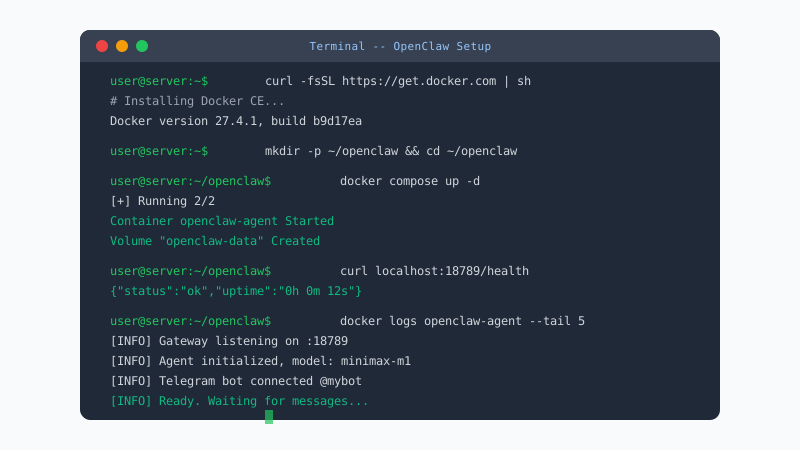
3. Test Before Publishing
Create at least five realistic prompt scenarios, including malformed input and missing credentials. Confirm the skill fails safely and explains next steps clearly.
Version the skill and keep changelogs so rollbacks are easy.
# Test the skill via Telegram
/standup

# Check logs for errors
docker logs openclaw-agent --tail 50
Conclusion
Your first skill should do one thing well. Keep the scope narrow, test with realistic inputs, and confirm it fails safely on bad data before expanding to more complex workflows.
Skip the setup? DoneClaw deploys OpenClaw for you — $29/mo with 7-day free trial, zero configuration.
Get your own AI agent today
Persistent memory, channel integrations, unlimited usage. DoneClaw deploys and manages your OpenClaw instance so you just chat.
Get StartedFrequently asked questions
How long should a first skill take?
A focused first skill can be built in a few hours if scope is tight and external dependencies are limited.
Should I allow internet access by default?
No. Grant only the minimum permissions needed for the exact job your skill performs.